Loading page

Qwairy v1.21 recommends the prompts worth tracking from day one, adds Prompt Studio, guided onboarding and Supervision, and lets your tools and AI assistants act through the REST API and MCP.
Every AI visibility metric depends on a choice made before the first answer is collected: the prompts you track.
Track the wrong questions, and your dashboard becomes very precise about things your buyers never ask. Track the right ones, and every mention, citation and competitor gap starts to mean something.
Qwairy v1.21 is built around that choice.
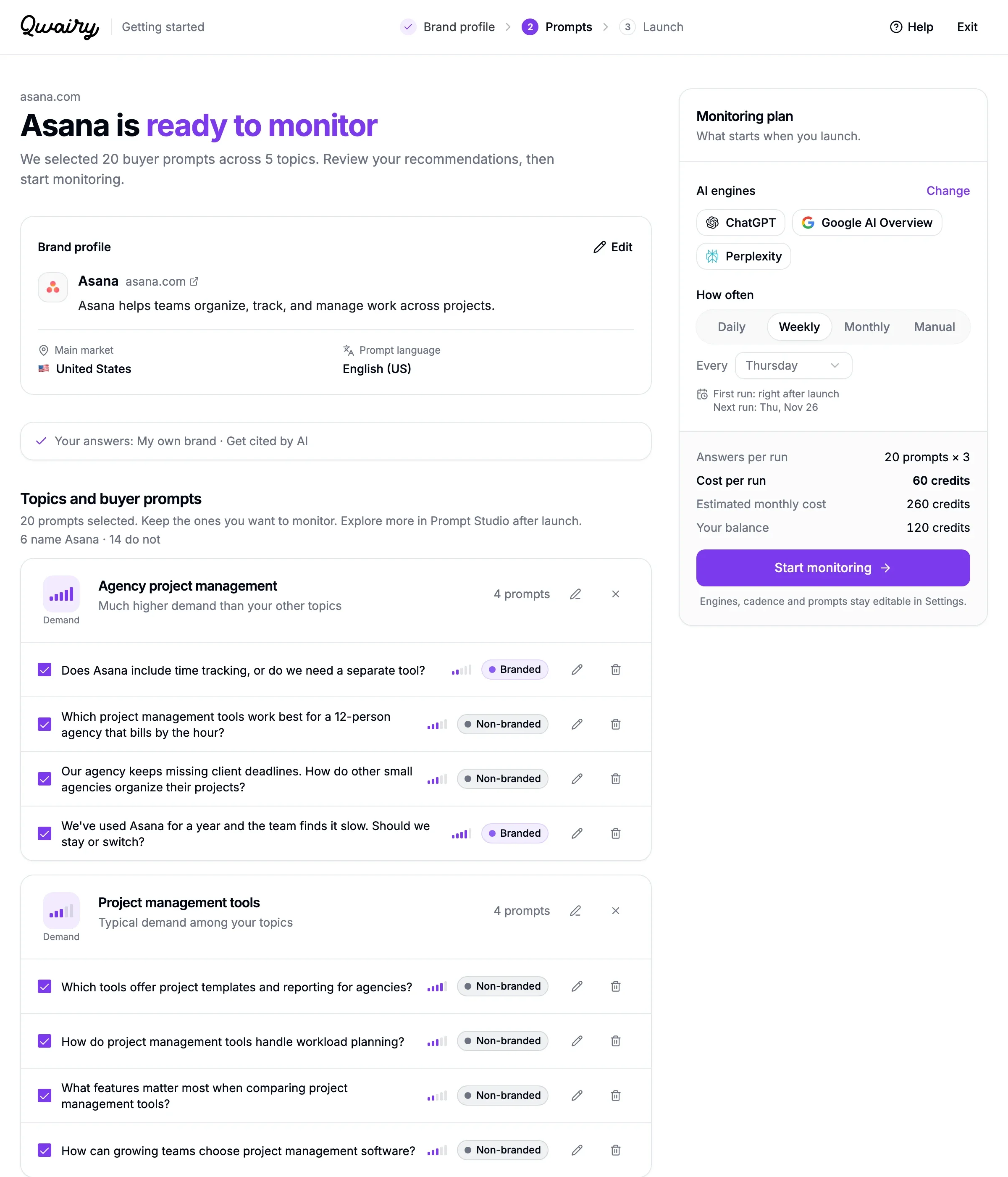
Recommended prompts are now chosen the way your buyers ask: branded and non-branded, across the whole buying journey, including post-purchase questions.
Guided onboarding sets up a new account's first workspace from its website, and shows the first answers as they arrive.
Prompt Studio ranks the prompts worth adding next by estimated demand and score, and refreshes them as you add prompts from it.
Write access for the REST API and MCP lets your tools and AI assistants act on your monitoring, with integration webhooks to follow every run.
Supervision shows agencies and multi-brand teams which of their workspaces need attention.
Plus harmonized detail pages, On-Page Presence as a matrix and the Countries filter in Source Explorer.
Screenshots use illustrative data.
Writing prompts is easy. Choosing them is the hard part.
A keyword such as "best project management software" tells an AI assistant very little. Real questions carry the buyer's situation, constraints and stage:
This is the kind of prompt Qwairy now recommends. It reads your website, works out what you sell and who buys it, and maps the topics your buyers care about. It then writes many candidate prompts for each topic and scores every one of them before recommending anything.
Qwairy keeps the prompts that read like something a person would really ask, fit your offer and leave room for an answer that recommends brands.
In workspaces created from v1.21, every prompt carries a Branded or Non-branded tag, set by Qwairy from its text however the prompt was added: recommended, imported, typed, or created through the REST API or MCP.
A prompt that names your brand is almost always answered with your brand, often in first position. Mixed with the others, it makes your visibility look better than it is. So the dashboards of these workspaces open on non-branded prompts, the way they open on the last 30 days, as soon as the workspace has some. Workspaces created earlier keep their current view, with every prompt.
Branded and Non-branded work like any other tag in the Tags filter, which now comes before the period: select Branded to see what AI says when buyers name you, or select both to see every prompt. Prompt tracking keeps listing all your prompts.
You get up to five topics and twenty prompts: a list you can review in a few minutes before monitoring starts.
When a market is narrow, the list is shorter rather than padded. The other candidates stay available in Prompt Studio.
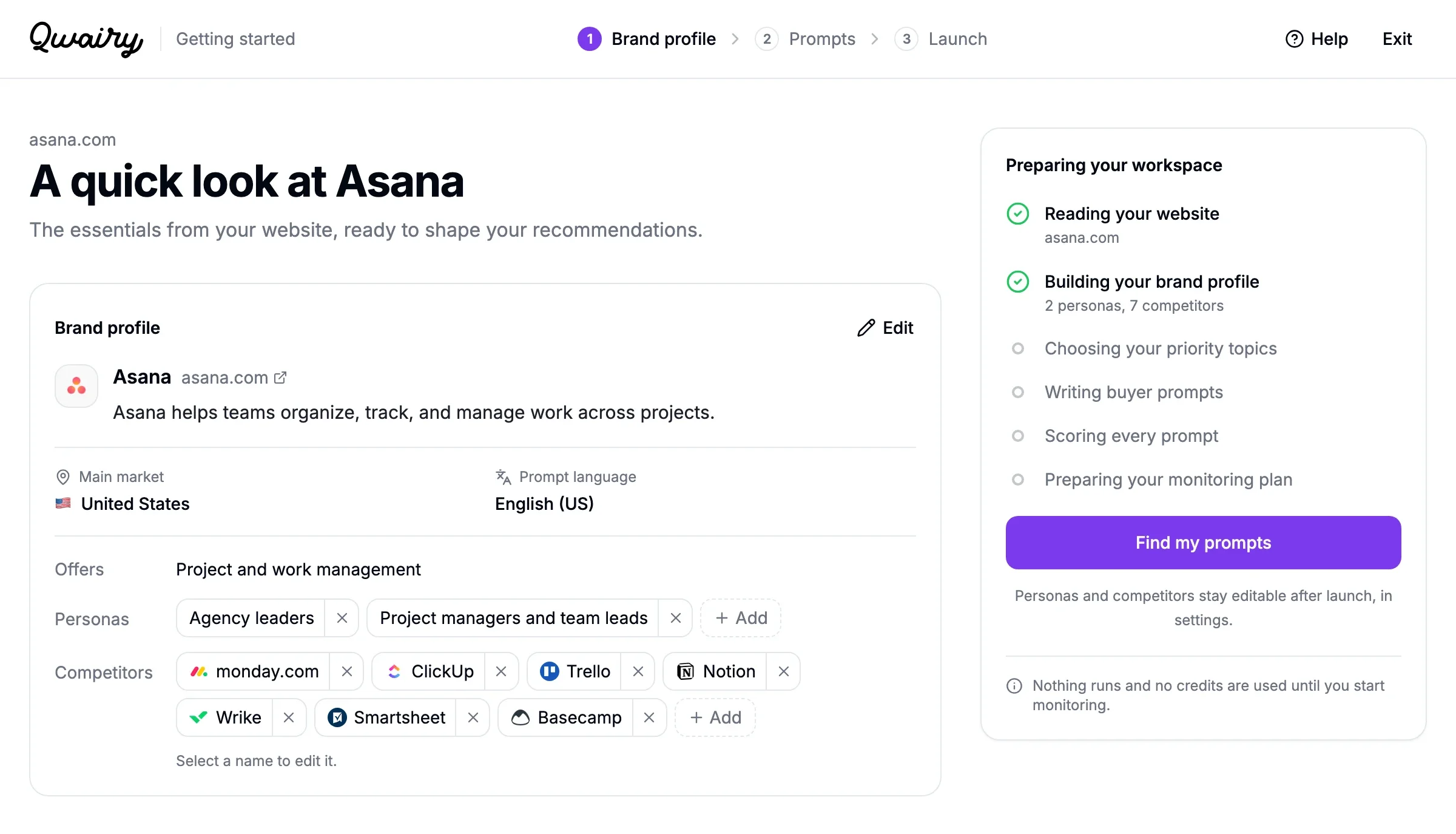
When you open a new Qwairy account, your first workspace comes with a guided setup.
Enter your website. While Qwairy reads it, two optional questions help it focus: whose visibility you want to track, and what matters most right now.
You then confirm your brand profile: what your brand does, your markets, the personas you sell to and a few competitors to watch. Qwairy proposes each of them; you only adjust or complete what needs it. You can edit personas later in Workspace Settings > Personas, and competitors in Competitor Mentions.
Next come your recommended prompts, each with its Branded or Non-branded tag and its estimated demand. Keep what fits, and start monitoring.
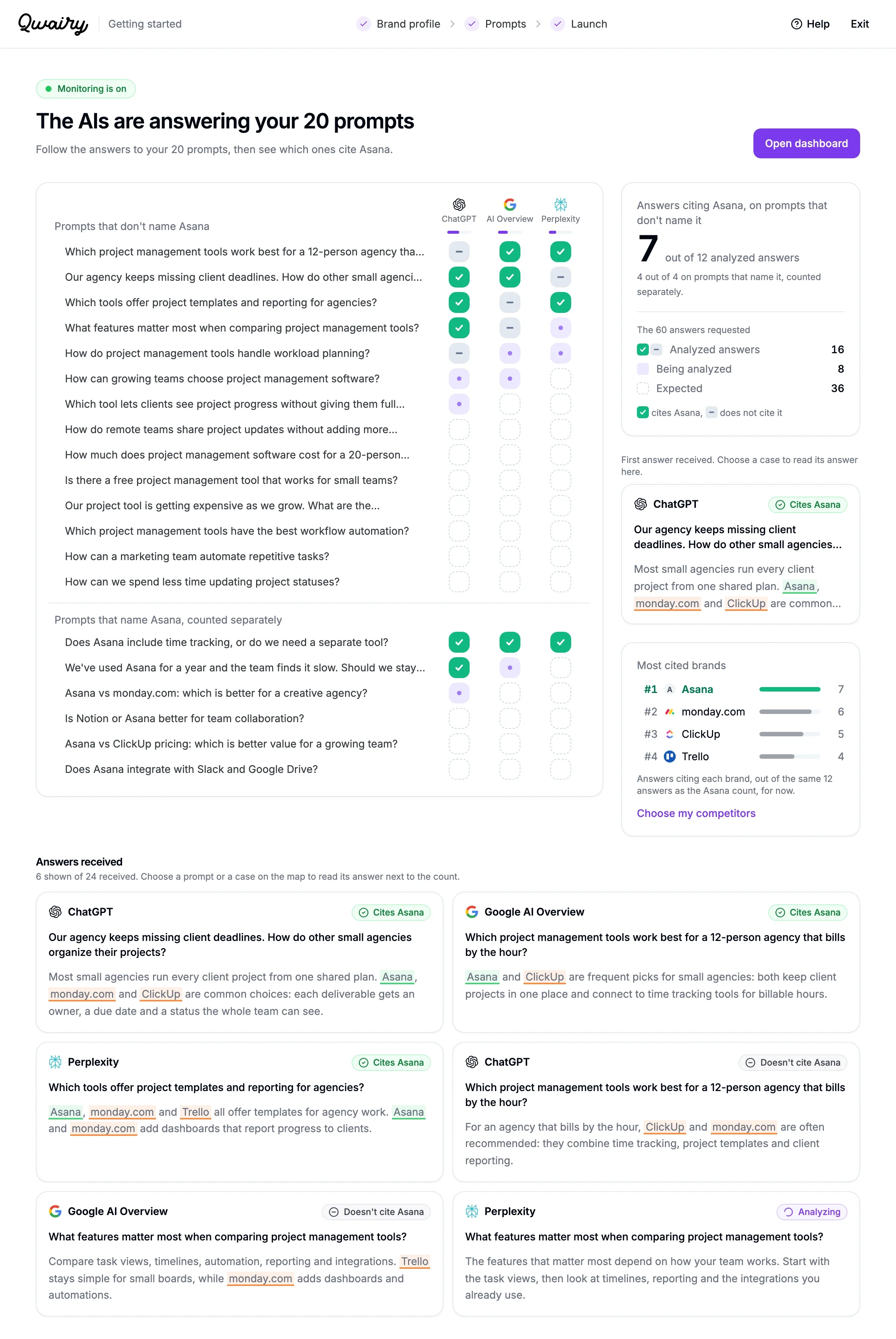
The first run starts right away. You follow each AI engine as it replies, see which answers already cite your brand, and which other brands they cite.
Collection usually takes 2 to 5 minutes, and your dashboard is available from the start.
Starten Sie ein kostenloses Audit: In wenigen Minuten beantworten ChatGPT, Gemini und Perplexity live 8 Kauffragen zu Ihrem Markt, und Sie sehen, wen sie empfehlen.
Agencies and multi-brand teams do not need a tour for every new workspace. Every other workspace, including those created by invited members or for client teams, offers three ways to start:
Navigate to Workspaces > Create workspace to start.
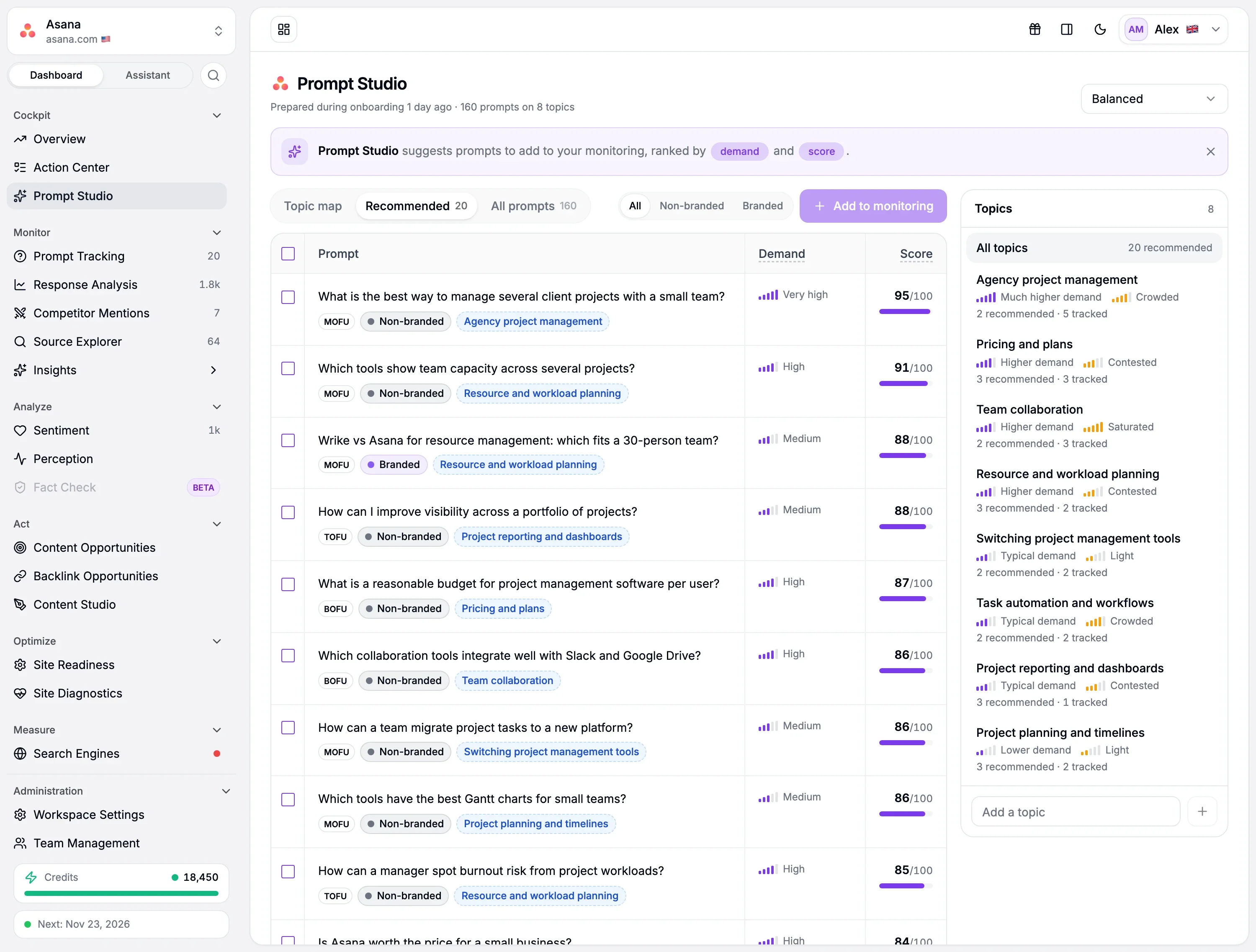
A list of prompts is never finished. New angles appear and markets move.
Prompt Studio, a new page in the Cockpit, keeps the prompts worth adding next ready and ranked.
Demand is an estimate, not a search volume. It helps you compare prompts with each other; it does not forecast traffic.
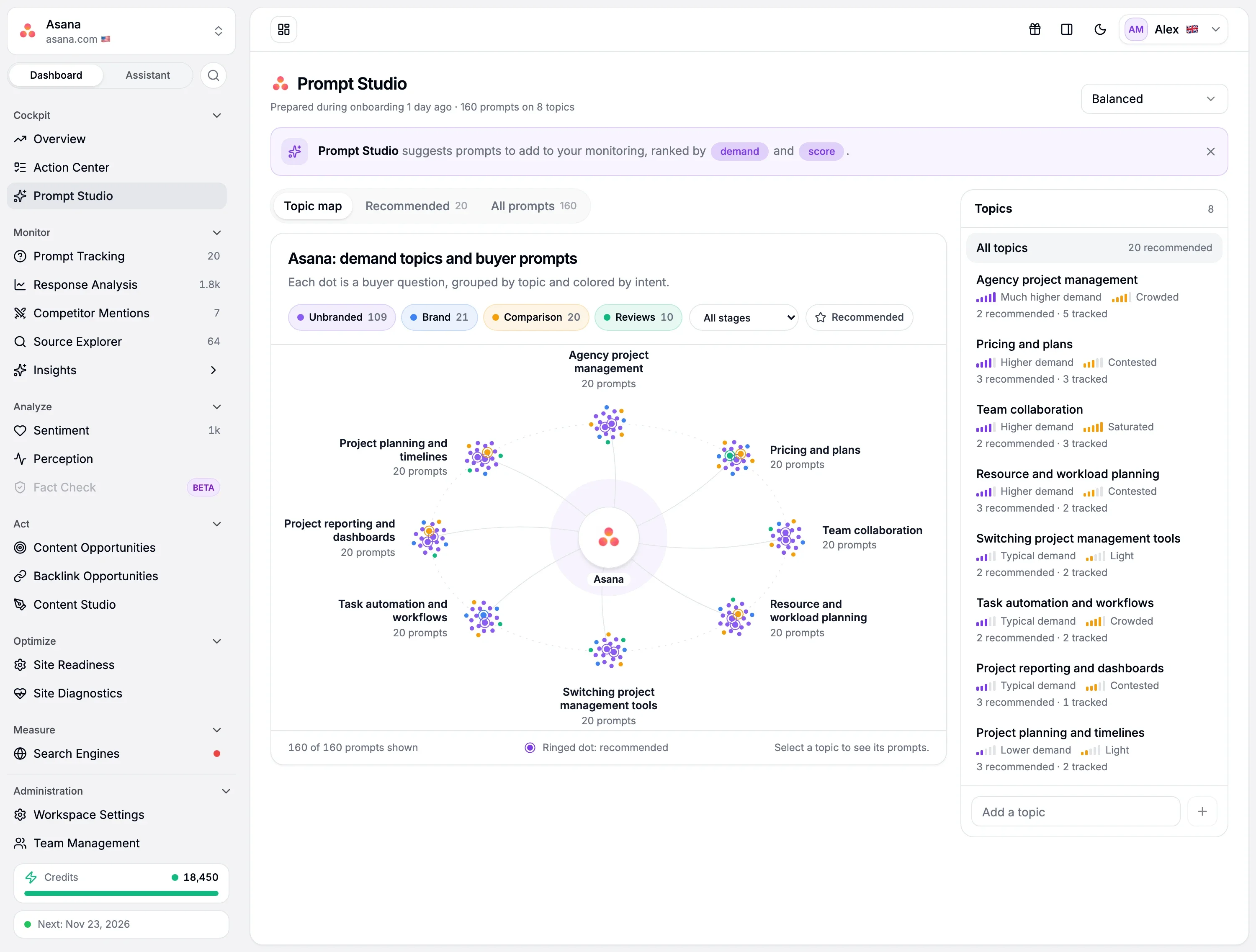
Each focus steers the recommendations differently:
Filter on Branded or Non-branded, spot the recommendations marked New, select the prompts you want and add them to monitoring in one click. You can also ask for more prompts on a topic, or open a new one.
After onboarding, your next recommendations are already waiting in Prompt Studio.
When you add prompts from Prompt Studio and a tracked topic runs low on fresh recommendations, Prompt Studio writes new ones for it automatically, at most once every 30 days per topic. Topics you leave untouched keep their recommendations.
Prompt Studio is included in every plan, Free included. Everyone on the team can browse it; Managers and Owners can ask for new recommendations, within daily allowances. You can read recommendations through the MCP server from the Starter plan and through the REST API from the Growth plan; generating and accepting them there requires write access.
Navigate to Cockpit > Prompt Studio to explore.
Until now, the REST API and MCP could read your data. With v1.21, they can act on it.
Your own tools and the AI assistants you connect to Qwairy can create a workspace, add prompts and topics, accept Prompt Studio suggestions or start a run, then get notified when the work is done. Monitoring becomes part of the workflows your team already runs.
On Business, Agency Business and Enterprise plans, write access is turned on key by key. Writes support idempotency keys, version checks and a dry-run mode, within 120 writes per minute and 5,000 per day.
The API now covers 79 operations, 28 of them writes.
On Business, Agency Business and Enterprise plans, like REST API writes, the AI assistants you connect to Qwairy can create and update workspaces, prompts, topics, tags, Prompt Studio suggestions, runs and more, with 16 write tools. Three more write tools, for Pitch Audits, are reserved for agency teams. In all, the MCP server exposes 73 tools, 19 of them write tools.
You stay in control. Write access is never granted by default and is reserved for Managers and Owners. Creating a workspace, starting a run, accepting suggestions, changing a workspace, its monitoring or an existing prompt, and any write that raises credit use first return a preview of their effect and credit impact. The write only goes through with a confirmation tied to that preview, and your assistant is instructed to ask for your approval first. Topics and tags cannot be deleted through MCP.
Get a signed notification when a run completes, fails or is cancelled, when a Pitch Audit completes or fails, when a Site Diagnostics audit completes, or when prompt suggestions are ready or fail. Each delivery is attempted up to 8 times over 24 hours, and a finished delivery can be sent again within 30 days. Webhooks are set up through the REST API, on Business plans and above.
Navigate to Integrations > REST API or Integrations > MCP Server to get started.
Verbinden Sie Ihre Server- oder CDN-Logs, um zu sehen, welche Seiten bekannte KI-Crawler abrufen, wie oft und wie sich das entwickelt.
Screenshots use illustrative data.
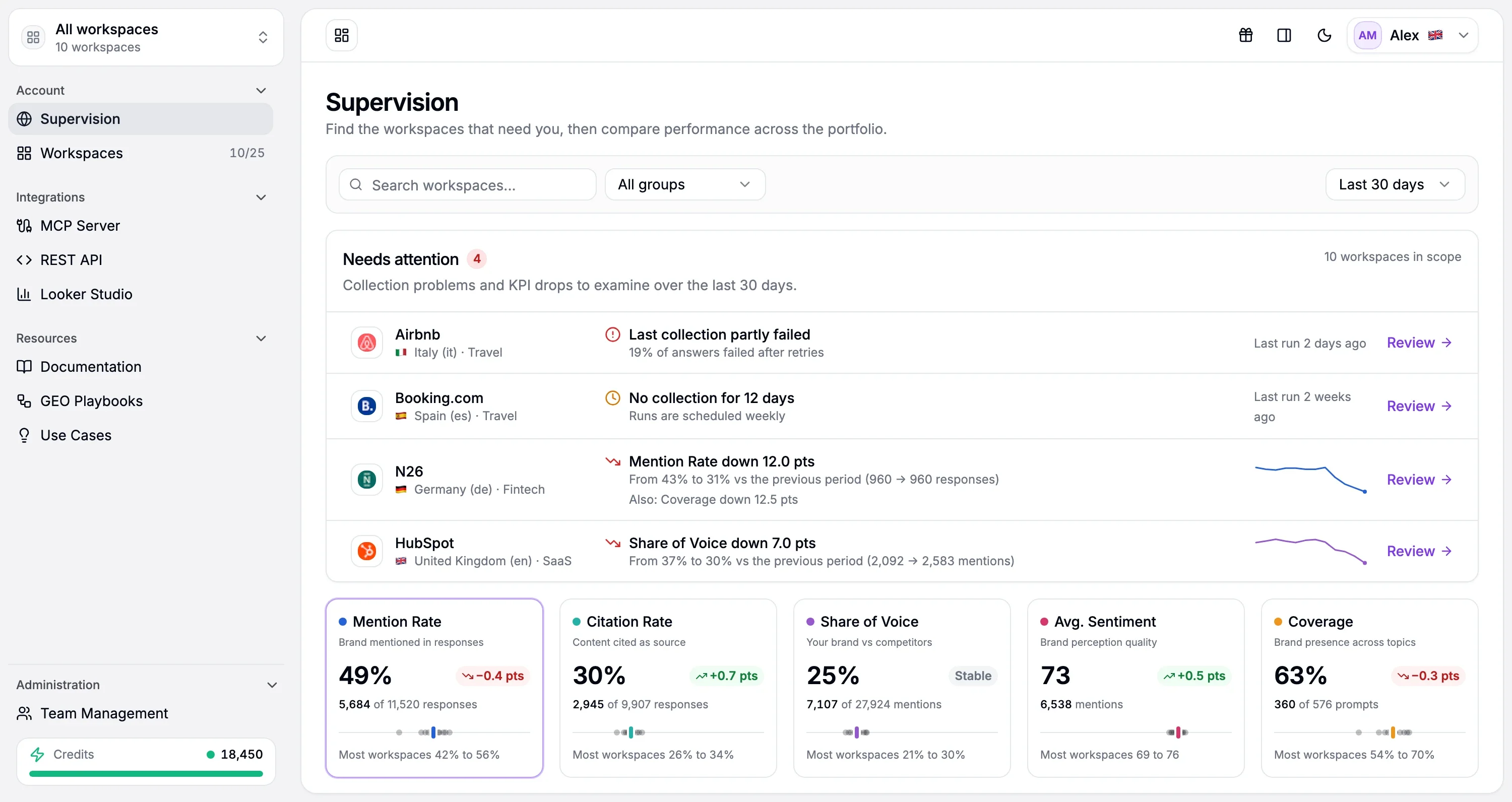
When you manage ten or fifty workspaces, opening them one by one is not a review. You need to know where to look first.
Supervision brings all your live workspaces into one portfolio view. It is now available to Managers and Owners on Business, Agency Business and Enterprise plans.
Search for a workspace, or narrow the view by group, market and period. Open a workspace to review its monitoring, its mentions by engine, its top competitors and what changed.
Navigate to Account > Supervision to explore.
Pick what matters most:
Good monitoring starts with good prompts. v1.21 helps you choose them, and keeps them fresh.
Already on Qwairy? Everything above is in your dashboard, according to your plan. New here?
Start with Qwairy | Book a demo | Read the documentation
Verfolgen Sie die Fragen, die für Ihr Geschäft zählen, sehen Sie, welche Marken jede Antwort erwähnt und welche Quellen sie zitiert, und arbeiten Sie an den Lücken.
Kostenloser Plan mit 120 Startcredits • Keine Kreditkarte erforderlich
Weitere Artikel
Qwairy v1.19: Source Authority, Agent Skills & Connected Analytics
Qwairy v1.19 introduces Source Authority, 36 Agent Skills, rebuilt Crawler Analytics and broader analytics connections to turn AI visibility data into action.
Qwairy v1.20: Follow-Ups, Multi-country Workspaces & Post-purchase
Qwairy v1.20 adds Follow-Ups, multi-country workspaces, a Post-purchase stage and personas, with a catalogue of 18 AI engines from 15 providers, including Claude in its real interface.