Loading page

Not all AI crawlers do the same job. Learn which bots to allow or block in robots.txt - GPTBot, ClaudeBot, PerplexityBot and more - without accidentally deleting yourself from AI answers.

A new class of crawler is hitting your site, and it doesn't behave like Googlebot. GPTBot, ClaudeBot, PerplexityBot, OAI-SearchBot and a dozen others now request your pages every day - some to train models, some to build the live indexes that AI answer engines cite, some to fetch a single URL because a user just asked a question.
Your robots.txt file is the front door for all of them. And the reflex reaction - "block the AI bots, they're stealing my content" - is a decision with real consequences. Block the wrong crawler and you don't just protect your content; you can sharply reduce whether ChatGPT, Perplexity, or Gemini can retrieve and cite your pages, although the exact effect varies by engine and discovery path.
The problem is that "AI crawler" is not one thing. Training crawlers, retrieval crawlers and user-triggered fetchers do completely different jobs, and blocking each one costs you something different. Treating them as a single group is how sites accidentally trade away their AI visibility to make a point about training data.
This guide walks through the major AI user-agents and what each actually does, the real allow/block trade-off (which is more nuanced than most "block everything" posts admit), a copy-pasteable robots.txt for two common strategies, and how to see which crawlers are really visiting you. The goal: make a deliberate choice, not a reflexive one.
robots.txt** is a voluntary instruction file, not a security control.** It lives at the root of your domain (example.com/robots.txt), and it tells compliant crawlers which paths they may and may not request. The format is simple: a User-agent line naming a crawler, followed by Allow and Disallow rules. The Robots Exclusion Protocol was formally standardized in 2022 as RFC 9309 .
Three things about it are easy to forget and matter enormously here:
Disallow today does nothing to remove that. robots.txt governs future requests, not past training.robots.txt job.Google-Extended and Applebot-Extended don't fetch anything. They're opt-out labels you place in robots.txt to control how an existing crawler's data is used. Blocking them changes usage rights, not crawl access.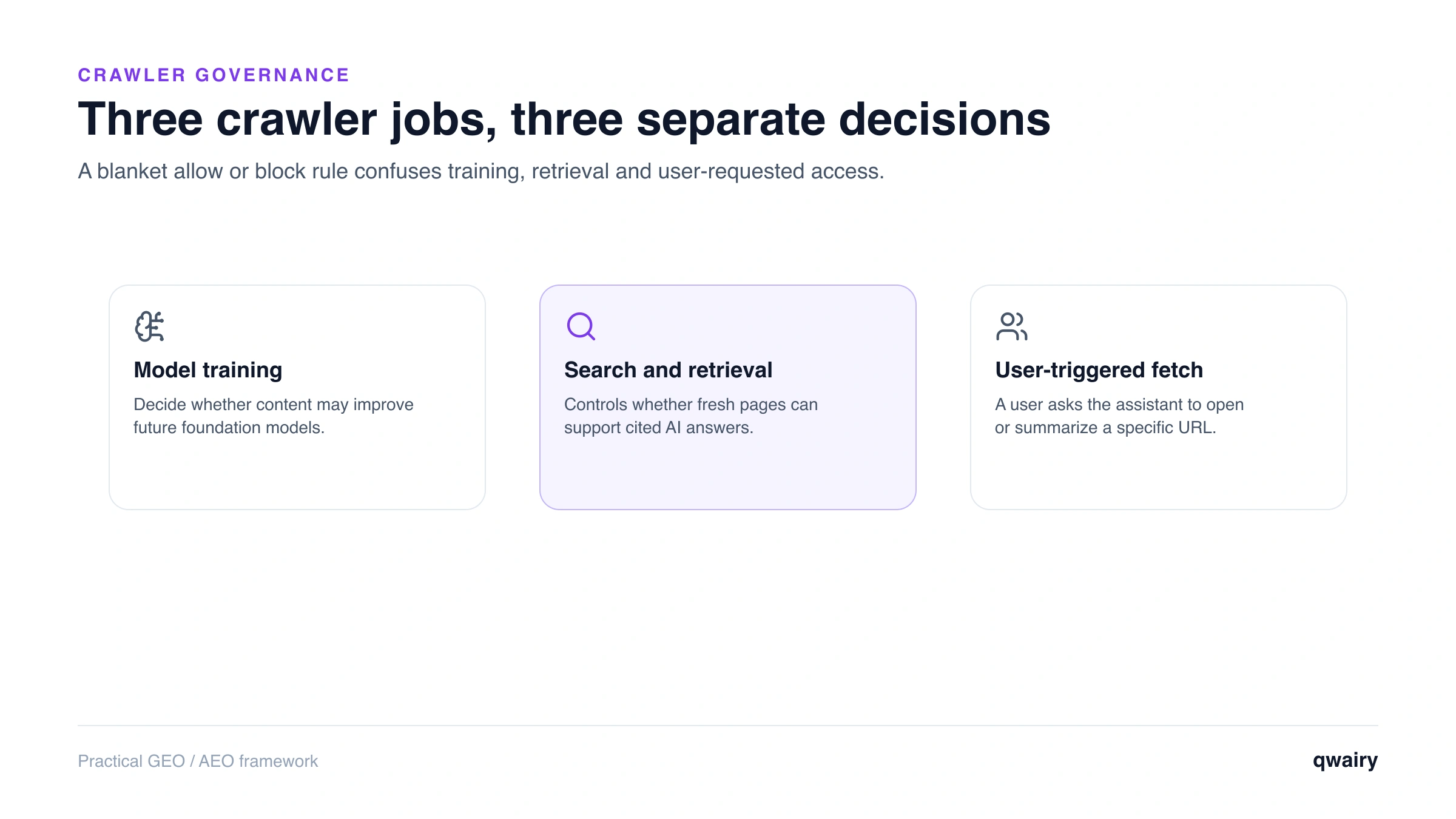
Before you allow or block anything, sort every crawler into one of three buckets. This single distinction drives the entire trade-off.
Job | What it does | What blocking it costs you |
Training | Collects content to train future model versions. Feeds the model's "parametric" memory. | Your content isn't used to train the next model. Effect on being *cited* is indirect and uncertain. |
Retrieval / search indexing | Builds the live index an answer engine searches at query time, then cites with a link. | Can remove pages from that engine's live retrieval index and sharply reduce citation eligibility; the exact effect varies by platform and other discovery sources. |
User-triggered fetch | Grabs a specific page in real time because a user asked the assistant about it or clicked a link. | The assistant may be unable to open your page on a user's behalf, reducing on-demand, high-intent visibility. Some user-triggered agents, including `Perplexity-User`, generally ignore `robots.txt`. |
The headline: blocking training crawlers is a content/rights decision; blocking retrieval and user-triggered crawlers is a visibility decision. People conflate the two, block everything, and lose visibility they actually wanted to keep.
Here are the user-agents that matter, grouped by operator. Names are current as of mid-2026 - this list changes, so treat it as a starting point and confirm against each vendor's own docs.
OpenAI runs three separate crawlers , each independently controllable in robots.txt:
GPTBot - training. Crawls public content to train future GPT models.OAI-SearchBot - retrieval. Builds the index behind ChatGPT search, so your site can surface and be linked in ChatGPT's answers. It is not a training crawler.ChatGPT-User - user-triggered. Fetches a page on behalf of a specific user action rather than crawling automatically. OpenAI states it is not used for broad, automatic web crawling.The practical upshot: you can allow AI-search inclusion (OAI-SearchBot) while blocking training (GPTBot). They're different lines.
One counterintuitive detail worth knowing: blocking OAI-SearchBot does not guarantee you disappear from ChatGPT. OpenAI notes that a URL and page title obtained from another search provider can still surface. If your goal is genuine exclusion rather than reduced crawling, OpenAI's own guidance is to allow the crawler to read the page and use a noindex directive instead. Blocking the crawler alone gets you the worst of both worlds: no citation, and no control over what's shown.
Anthropic also operates three bots , and says all three honor robots.txt:
ClaudeBot - training. Downloads data to train Claude's models.Claude-SearchBot - retrieval. Indexes and navigates the web to improve Claude's search results.Claude-User - user-triggered. Accesses a page when a Claude user asks a question that needs it.Older Anthropic tokens like anthropic-ai and Claude-Web appeared historically; the three above are the current documented set. All three honor standard robots.txt rules and support Crawl-delay, and rules apply separately per hostname or subdomain - so a rule on your root domain does not cover your docs or blog subdomain.
Perplexity documents two agents :
PerplexityBot - retrieval/search indexing. Builds the index Perplexity references and links to. Perplexity states it is not used to train foundation models.Perplexity-User - user-triggered. Visits a specific page in response to a user request. Perplexity has argued this is "an agent, not a bot" and therefore isn't bound by robots.txt.Perplexity is also the cautionary tale for trusting robots.txt alone: on August 4, 2025, Cloudflare documented tests in which Perplexity used an undeclared crawler, a generic browser user-agent, rotating IPs, and multiple ASNs after its declared crawlers were blocked. If you truly need to enforce a block, combine robots.txt with verified bot controls at the CDN or WAF layer.
Googlebot - the regular search crawler. It also underpins AI Overviews and AI Mode, which are built on Google's Search index. Block Googlebot and you fall out of Search and its AI surfaces.Google-Extended - a robots.txt token (not a crawler) to opt your content out of being used to train and ground Google's generative models (Gemini/Vertex AI). Crucially, Google states this does not affect your ranking or inclusion in Google Search. Because AI Overviews are sourced from the Search index via Googlebot, blocking Google-Extended is a training-usage decision, not a way to exit AI Overviews.Bingbot - Bing's search crawler. Microsoft Copilot is grounded largely on Bing's index, so Bing SEO and crawlability feed Copilot visibility. There is no simple, widely documented way to opt out of Copilot grounding independently of Bing indexing.CCBot - Common Crawl . It doesn't power a single assistant, but its open corpus has historically been used as training data across many LLMs. Blocking it limits one common training pathway.Applebot / Applebot-Extended - Apple's search crawler and its training opt-out token, respectively.Meta-ExternalAgent, Amazonbot, Bytespider (ByteDance), cohere-ai and others round out the list. Bytespider in particular is frequently blocked for aggressive crawling.Run a free audit: in a few minutes, ChatGPT, Gemini and Perplexity answer 8 buying questions about your market live, and you see who they recommend.
There is no single right answer - but there is a wrong way to decide, which is treating all AI crawlers as identical. Here's how the trade-off actually breaks down by bucket.
GPTBot, ClaudeBot, CCBot, Google-Extended). This is primarily a rights and principle decision: do you want your content in the next model's training set? The visibility cost is real but indirect and uncertain. Being in the training data is one way a model "knows" your brand, but the link between training inclusion and being surfaced or cited is fuzzy, and models increasingly answer by retrieving live sources rather than reciting memorized text. If your priority is protecting proprietary or premium content, blocking here is defensible and costs you little in day-to-day citations.OAI-SearchBot, PerplexityBot, Claude-SearchBot, Googlebot, Bingbot). This is where blocking usually hurts most. These crawlers build indexes that answer engines query when a user asks a question, and those engines cite what they retrieve. Blocking them removes one of the main discovery paths for your pages and can sharply reduce citation eligibility, even though some platforms may still surface a URL or title through another provider. For almost any brand that wants AI visibility, these should stay allowed.ChatGPT-User, Claude-User, Perplexity-User). These fire on genuine, high-intent moments when a user explicitly asks the assistant about you or a page. Blocking compliant fetchers can prevent the assistant from opening your page for that request. Note that Perplexity documents that Perplexity-User generally ignores robots.txt, so hard enforcement requires verified WAF or CDN controls.Two more realities to keep in mind:
Disallow won't erase you from models trained on that data.robots.txt** is a request, not a wall.** Compliant crawlers obey it; the Perplexity episode shows not everyone does. Real blocking needs edge/WAF controls (many CDNs now offer one-click AI-bot blocking).The clean mental model: decide training access as a content-rights question, and decide retrieval + user-triggered access as a visibility question. Answer them separately.
Run your goal through these questions, in order:
-Extended tokens, but keep retrieval and user-triggered crawlers allowed so you can still be cited.robots.txt), and negotiate access deliberately. Understand you're trading discovery for control.Disallow those paths for all crawlers regardless of the above - AI or not.Strategy A - maximize AI visibility, opt out of training only. Retrieval and user-triggered agents stay welcome; training crawlers and training tokens are blocked.
# --- Allow AI search & retrieval crawlers (keep AI citations) ---
User-agent: OAI-SearchBot
Allow: /

User-agent: Claude-SearchBot
Allow: /

User-agent: PerplexityBot
Allow: /

# --- Allow user-triggered fetchers ---
User-agent: ChatGPT-User
Allow: /

User-agent: Claude-User
Allow: /

User-agent: Perplexity-User
Allow: /

# --- Opt out of model training ---
User-agent: GPTBot
Disallow: /

User-agent: ClaudeBot
Disallow: /

User-agent: CCBot
Disallow: /

User-agent: Google-Extended
Disallow: /

User-agent: Applebot-Extended
Disallow: /
Strategy B - block AI crawlers broadly. Use this only if you accept materially reducing AI-answer visibility. It will not stop agents that ignore robots.txt; pair it with verified WAF or CDN controls when hard enforcement is the goal.
User-agent: GPTBot
Disallow: /

User-agent: OAI-SearchBot
Disallow: /

User-agent: ChatGPT-User
Disallow: /

User-agent: ClaudeBot
Disallow: /

User-agent: Claude-SearchBot
Disallow: /

User-agent: Claude-User
Disallow: /

User-agent: PerplexityBot
Disallow: /

User-agent: CCBot
Disallow: /

User-agent: Google-Extended
Disallow: /
Note: keep your existing User-agent: Googlebot and Bingbot rules permissive if you want any Search or AI-Overviews/Copilot presence - those are your organic-search lifelines, not just AI surfaces.
Each content opportunity is scored on AI potential, brand gap, source gaps and business impact, so your team starts where it counts.
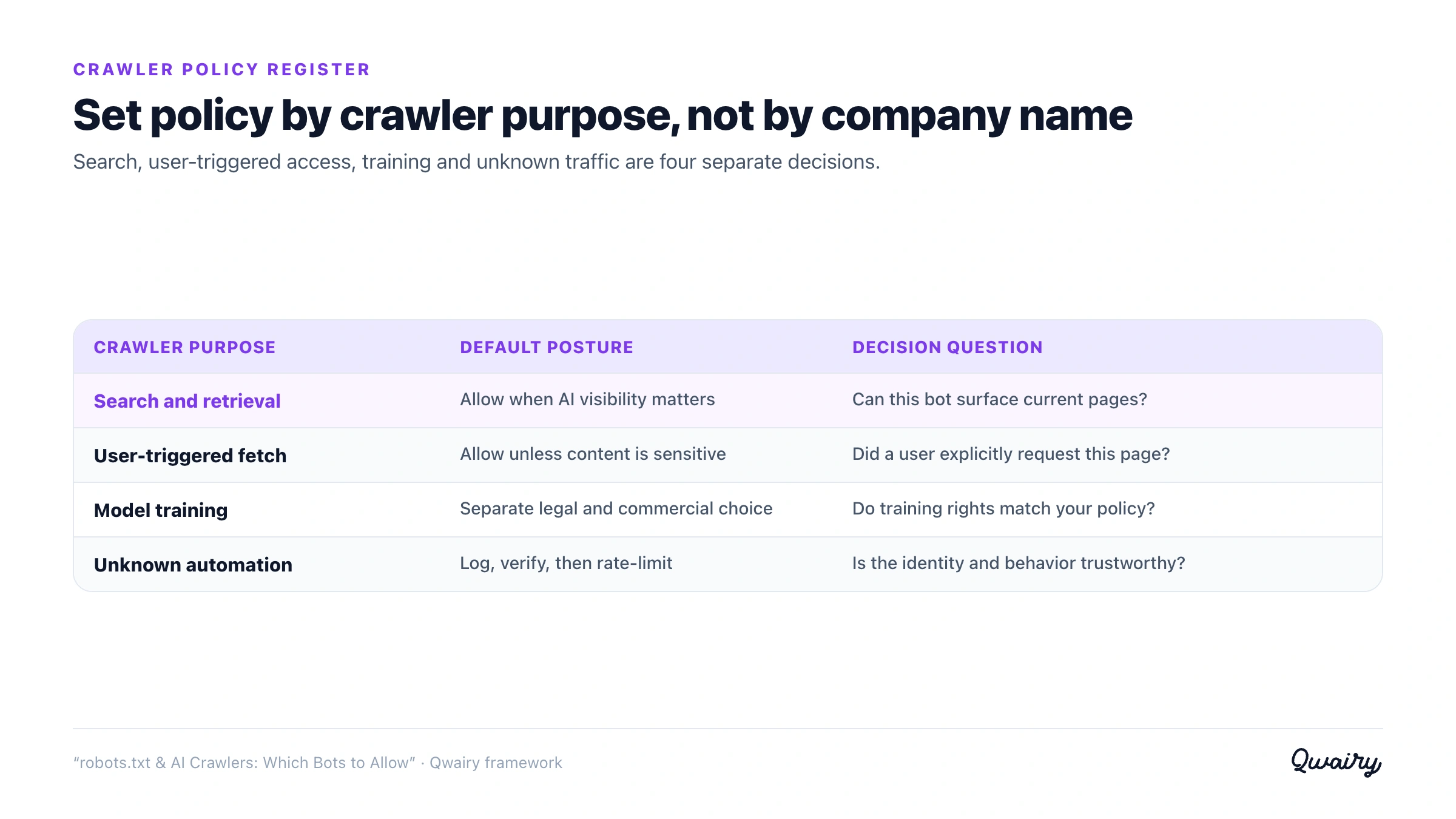
A robots.txt file is not a policy. It is one enforcement surface for a policy that should have an owner, a reason, and a review date. Use an AI crawler register so a privacy decision does not accidentally become a visibility outage.
Field | Required decision | Proof |
Agent and job | Training, search retrieval, user-triggered fetch, or dataset collection | Provider documentation |
Business intent | Allow, rate-limit, challenge, or block | Named policy owner and rationale |
Enforcement | robots.txt only, or robots.txt plus CDN/WAF control | Rule ID and tested response |
Expected consequence | Training opt-out, reduced citation eligibility, or no Search impact | Documented product surface affected |
Review trigger | Provider change, bot-name change, traffic anomaly, or quarterly review | Last reviewed date |
Before deployment, pass three gates:
This register turns crawler management into reversible change control instead of a collection of copied directives.
You can't manage what you can't see, and robots.txt gives you no feedback loop. To know whether your rules are working - and which bots are even interested in your content - go to the source of truth: your server logs.
User-Agent field for the tokens above: GPTBot, ClaudeBot, OAI-SearchBot, PerplexityBot, Claude-SearchBot, and so on.PerplexityBot from an unlisted IP is a red flag.This log analysis is tedious by hand, which is why crawler visibility is built into AI-visibility platforms. Qwairy surfaces AI crawler activity alongside the outcome that actually matters - whether those crawls translate into citations and mentions across ChatGPT, Claude, Perplexity, Gemini and Google AI Overviews. Seeing "GPTBot crawled 400 pages" next to "we were cited in N answers this week" is how you tell whether your robots.txt strategy is helping or quietly costing you. For more on the technical foundations of being read and cited by AI, see the Qwairy blog .
Complete the technical audit: Use the technical GEO checklist , test what survives JavaScript rendering , and read the evidence-based guide to llms.txt before adding another machine-readable file.
robots.txt is a blunt instrument pointed at a subtle problem. The mistake almost everyone makes is treating "AI crawlers" as one enemy to be blocked. They're not: training crawlers, retrieval crawlers and user-triggered fetchers do different jobs, and blocking each carries a different cost. Block training if that's your principled stance - but think hard before you block the retrieval and user-triggered agents, because those are the agents that provide a major path for an AI engine to retrieve and cite you. Make the call deliberately, write the rules explicitly, and then watch your logs to confirm reality matches intent.
Not on its own. GPTBot is OpenAI's training crawler. The crawler that lets you appear in and be cited by ChatGPT's live answers is OAI-SearchBot, and user-triggered fetches use ChatGPT-User. If you want to opt out of training but stay visible in ChatGPT, block GPTBot while allowing OAI-SearchBot and ChatGPT-User.
Blocking Google-Extended will not - Google states it's a training/grounding opt-out token that does not affect Search ranking or inclusion. But blocking Googlebot absolutely will: it powers Google Search and the AI Overviews and AI Mode built on that index. Keep Googlebot allowed unless you intend to leave Google Search entirely.
Only for compliant crawlers, and only going forward. A Disallow tells well-behaved training bots not to fetch new content, but it can't remove content from models already trained, from third-party datasets like Common Crawl that already contain your site, or from crawlers that ignore robots.txt. For hard enforcement you need firewall/WAF or CDN-level blocking, not just robots.txt.
GPTBot is automated crawling for model training - it systematically fetches pages to build a training corpus. ChatGPT-User is a real-time fetch triggered by a specific user action, like asking ChatGPT to read or summarize a page. One is bulk and background; the other is single-page and on-demand. You can allow or block them independently.
It depends on your goal. If you sell access to proprietary content, blocking training crawlers is reasonable and costs you little in day-to-day citations. But blocking retrieval crawlers (OAI-SearchBot, PerplexityBot, Claude-SearchBot) can remove your pages from those engines' live retrieval paths and materially reduce citation visibility. For most brands that want to be discovered, the answer is to opt out of training while staying open to retrieval.
The major, well-run ones say they do - OpenAI, Anthropic and Google document robots.txt support for their crawlers. But compliance is voluntary, and it isn't universal: Cloudflare reported in 2025 that Perplexity used undeclared crawlers to bypass no-crawl directives. Treat robots.txt as a clear signal to good actors, and use edge/WAF controls when you need to actually enforce a block.
Track the questions that matter to your business, see which brands each answer mentions and which sources it cites, then work on the gaps.
Free plan with 120 initial credits • No credit card required
Other Articles
GEO Strategy: 5 AI Search Truths and a 4-Step Framework
Five truths about AI search shared at the SEO & GEO Summit in Paris, and the 4-step GEO framework Qwairy gives every client to get recommended by ChatGPT, Gemini and other AI engines.
The GEO Mistake Everyone Makes: Tracking Only the First AI Answer
Most AI visibility checks stop at the first answer. But AI assistants turn questions into conversations, and the follow-up questions they suggest decide which brands stay in the race.