Loading page

Most AI crawlers read raw HTML and never run your JavaScript, so client-side content is invisible to them. Learn how to test for it and fix it with SSR, SSG, or prerendering.

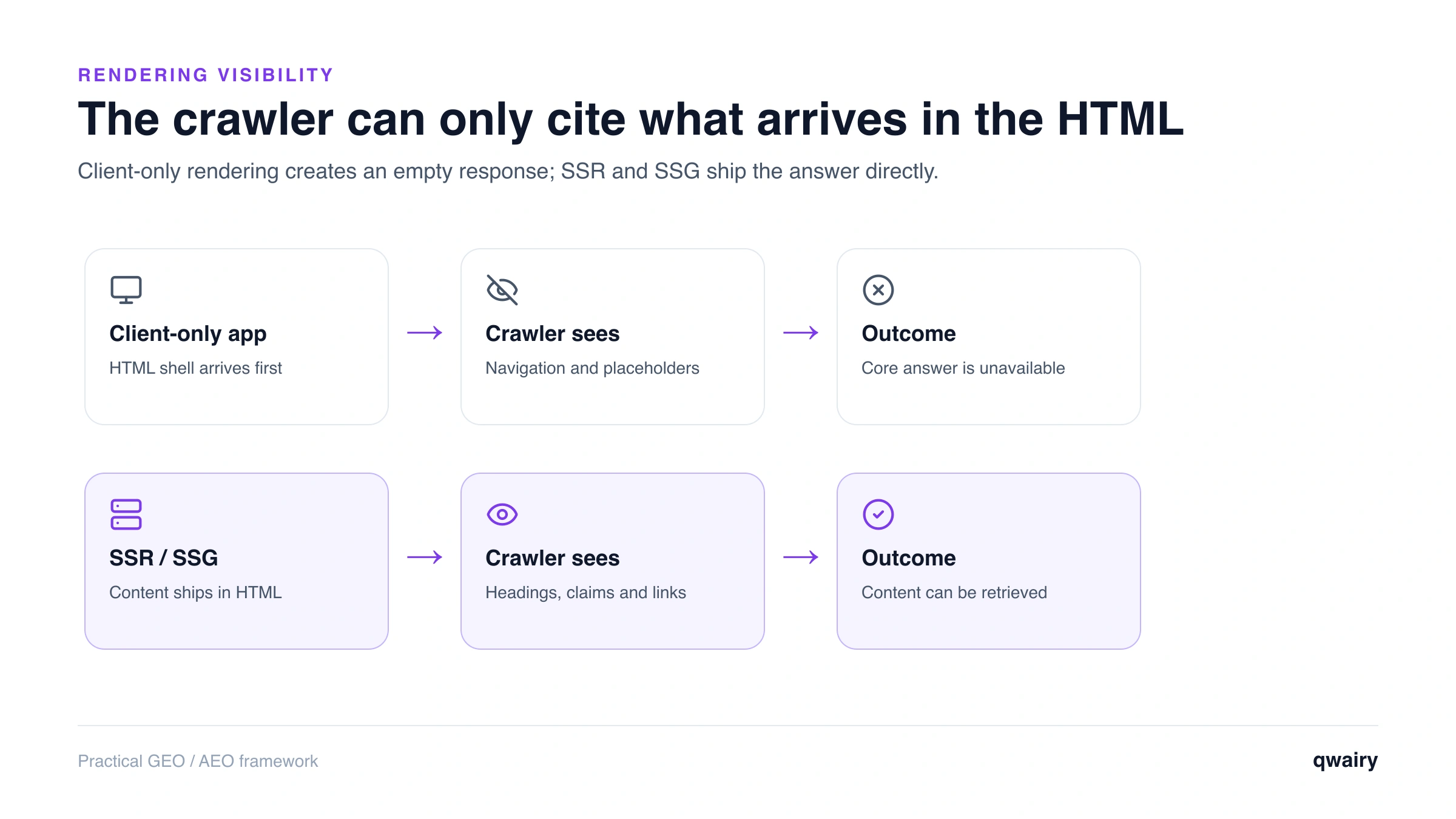
The core problem is a mismatch between how your site delivers content and how AI crawlers consume it. A modern single-page app (SPA) built with React, Vue, or Angular often ships a nearly empty HTML document plus a bundle of JavaScript. The browser runs that JavaScript, calls your APIs, and paints the content. A human sees a full page. A crawler that doesn't execute JavaScript sees the empty shell it was handed. Search engines learned to work around this by rendering. Google runs a two-pass process: it crawls the raw HTML, then queues the page for rendering in a headless Chromium instance before indexing the final DOM (Google Search Central: JavaScript SEO basics ). It's slower and more expensive than reading static HTML, but it means client-side content eventually gets indexed. Most AI crawlers don't do this. They behave like a plain HTTP client: request the URL, read the returned HTML, move on. Vercel's analysis of AI crawler traffic found that major AI bots - including OpenAI's GPTBot and Anthropic's ClaudeBot - fetched JavaScript files but did not execute them, so content that only exists after client-side rendering was effectively invisible to them (Vercel: The rise of the AI crawler ). Behavior can change over time, so treat this as the current baseline rather than a permanent law, and re-test periodically. The practical rule is blunt: if the words aren't in the raw HTML response, they don't exist for these systems.
Google AI Overviews and Gemini are a partial exception, because they lean on Google's existing web index. Content that Google already rendered and indexed can surface in an AI Overview even if it was built client-side, since the heavy rendering happened earlier in Google's pipeline. Don't lean on that as a strategy. ChatGPT, Perplexity, Claude, and Copilot each run their own retrieval, and they don't inherit Google's rendered index. Optimizing only for the one engine that renders leaves you invisible on all the others. Treating the raw HTML as the source of truth is the safer default across every engine.
It helps to separate the pipeline into stages, because each one can fail independently:
Client-side rendering quietly breaks step 2. And when step 2 fails, step 3 never gets the chance to happen - the bot crawled you successfully, saw nothing worth quoting, and moved on. Your server logs show the hit; your visibility shows nothing.
Run a free audit: in a few minutes, ChatGPT, Gemini and Perplexity answer 8 buying questions about your market live, and you see who they recommend.
Rendering support splits roughly along "search engine" versus "AI-native crawler" lines, but the map keeps shifting, so verify before you bet on it. The general picture as of 2026:
Crawler / user-agent | Operator | Executes JavaScript? |
Googlebot | Google | Yes - two-pass rendering |
Bingbot | Microsoft | Yes, at least partially |
GPTBot / OAI-SearchBot | OpenAI | No |
ClaudeBot / Claude-Web | Anthropic | No |
PerplexityBot | Perplexity | No |
Google-Extended | Google | Not a crawler - a training opt-out token, no separate renderer |
Two nuances are worth holding onto:
The safe operating assumption: write for a crawler that reads raw HTML and executes nothing. If your content survives that test, it survives everywhere.
You don't need special tooling to catch this - you need to look at the HTML the server actually returns, not the page your browser paints. Work through these checks on any page you care about.
view-source: on the URL (or press Ctrl/Cmd+U). This shows the HTML as delivered, before JavaScript runs. Search it for a distinctive sentence from your main content. If it isn't there, neither is it there for a non-rendering crawler.curl -A "GPTBot" https://yourdomain.com/page and read the output. curl never executes JavaScript, so it approximates what a non-rendering AI bot receives. Empty <div id="root"></div> with no body copy is the smoking gun.Run these on your highest-value pages first: product pages, pillar guides, comparison pages, anything you want cited. If the raw HTML is thin, you've found your invisibility problem.
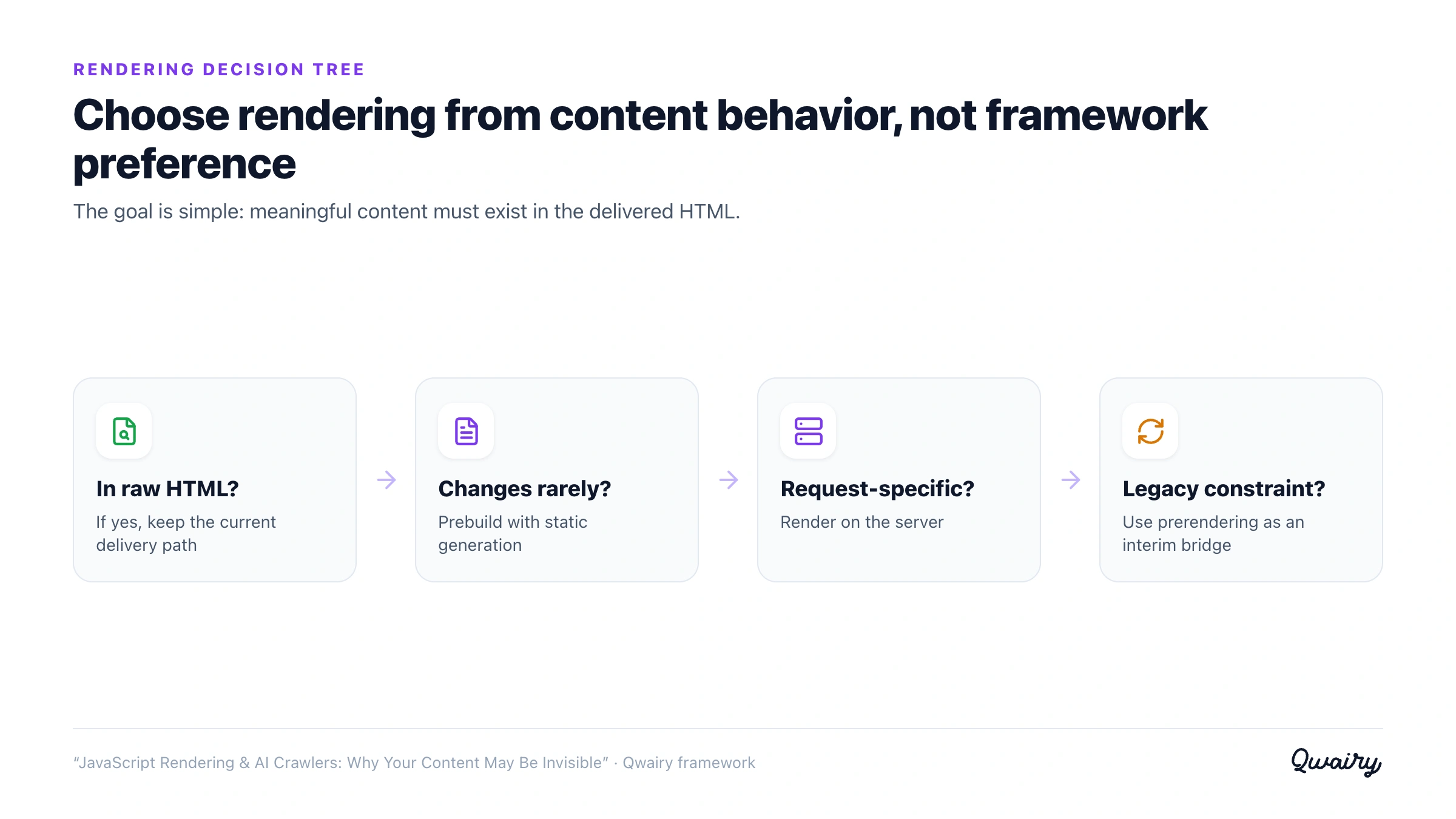
The fix is always the same idea - deliver meaningful HTML in the first response instead of assembling it in the browser. How you get there depends on your stack and how dynamic the content is.
SSR builds the full HTML on the server for each request, then hydrates it in the browser. Frameworks like Next.js, Nuxt, Remix, and SvelteKit make this the default path. The crawler receives a complete document; the user still gets an interactive app after hydration. This is the most robust option for content that changes per request or per user, and it's the safest default for anything you want AI engines to read.
Check your robots.txt rules, llms.txt and sitemap signals for AI crawlers before rewriting a single page.
SSG renders pages to static HTML at build time and serves them as flat files. For content that doesn't change on every request - blog posts, documentation, marketing and comparison pages - SSG gives you fully-formed HTML with the least runtime complexity and the best performance. If your citable content is mostly editorial, this is often the simplest and most durable fix.
Prerendering serves a pre-built HTML snapshot to bots while humans keep the client-side app. Services and self-hosted tools (for example, Prerender-style middleware or a headless-Chromium snapshot layer) intercept crawler requests, render the page once, and return the static result. Treat this as a bridge, not a destination. It adds a moving part that can drift out of sync with the live page, and Google has long framed dynamic rendering as a workaround rather than a recommendation (Google Search Central: dynamic rendering ). If you're already on a modern framework, migrating key routes to SSR or SSG is usually cleaner than maintaining a snapshot layer forever.
The goal isn't "SSR everything." It's making sure every page that carries an answer ships that answer in its first byte of HTML.
Shipping SSR is a hypothesis; citations are the proof. After you change how a page renders, watch two things: whether AI crawlers are reaching the page, and whether your brand starts showing up in AI answers that pull from it. Server logs and crawler analytics tell you the first half - which AI user-agents hit which URLs, how often, and whether they're getting real HTML back. The second half is visibility: are ChatGPT, Perplexity, Gemini, and Claude now surfacing and citing the page for the prompts you care about? This is the gap Qwairy is built to close. It tracks how your brand appears and gets cited across the major AI engines, shows which sources and pages the models actually pull from, and surfaces crawler activity so you can confirm the bots are reading rendered content rather than an empty shell. When a fix works, you see citations appear; when a page stays invisible, you know to look at rendering first. There's also an agent-native MCP endpoint if you'd rather query that data from your own tools.
Complete the rendering fix: Run the technical GEO checklist , align bot access with the robots.txt and AI crawler guide , and strengthen discovery through site architecture for AI .
Client-side rendering was a UX decision that quietly became a visibility decision. Human visitors never noticed, so the cost stayed hidden - until AI assistants became a primary discovery surface and started skipping any page whose content lives only in JavaScript. The remedy is old-fashioned and reliable: put your words in the HTML. Render on the server or at build time, test what non-rendering bots actually receive, and confirm the fix with real citations rather than assumptions. Do that, and the pages you worked so hard to optimize finally become readable by the engines deciding what to recommend.
As a rule, no. Public analysis of AI crawler traffic has found that the major AI bots fetch JavaScript files but don't run them, so content that only appears after client-side rendering is invisible to them. Googlebot is the notable exception because it renders pages in a two-pass process. Because crawler behavior evolves, re-test periodically rather than assuming today's behavior is permanent.
Google's rendered index can feed Google AI Overviews and Gemini, but ChatGPT, Perplexity, Claude, and Copilot run their own retrieval and don't inherit Google's rendering. Optimizing only for the one engine that renders leaves you invisible on the others. Serving crawlable HTML by default covers every engine at once.
Open view-source: on the page (or press Ctrl/Cmd+U) and search for a sentence from your main content. If the text isn't in the raw source but appears in the live page, it's being rendered by JavaScript. You can confirm by fetching the URL with curl, which never executes JavaScript, or by disabling JavaScript in your browser's DevTools and reloading.
Done well, it usually helps both. SSR and SSG deliver meaningful HTML faster, which improves perceived load time and gives every crawler - search and AI alike - complete content on the first request. Modern frameworks hydrate the page into a full interactive app after the initial HTML loads, so users keep the SPA experience.
It's a solid bridge, not an ideal endpoint. Prerendering serves crawlers a pre-built snapshot while users get the client-side app, which fixes visibility quickly. But the snapshot can drift out of sync with the live page and adds infrastructure to maintain, so if you can migrate key routes to SSR or SSG, that's generally cleaner and more durable.
Partly. Copilot is grounded in Bing, and Bing renders JavaScript to at least some degree, so client-rendered content Bing has indexed can still reach Copilot. That makes strong Bing SEO a useful path to Copilot visibility - but it doesn't help ChatGPT, Perplexity, or Claude, which is why crawlable raw HTML remains the safest baseline.
Track the questions that matter to your business, see which brands each answer mentions and which sources it cites, then work on the gaps.
Free plan with 120 initial credits • No credit card required
Other Articles
GEO Strategy: 5 AI Search Truths and a 4-Step Framework
Five truths about AI search shared at the SEO & GEO Summit in Paris, and the 4-step GEO framework Qwairy gives every client to get recommended by ChatGPT, Gemini and other AI engines.
The GEO Mistake Everyone Makes: Tracking Only the First AI Answer
Most AI visibility checks stop at the first answer. But AI assistants turn questions into conversations, and the follow-up questions they suggest decide which brands stay in the race.