
Loading page
My Website gives you a unified page inventory with AI citation data, GEO scores, and AI Readiness. Brand Associations reveal HOW AI describes you across 6 dimensions. Plus: Prompt Discover, Sentiment Analysis, Competitor Influence & 45+ Languages.
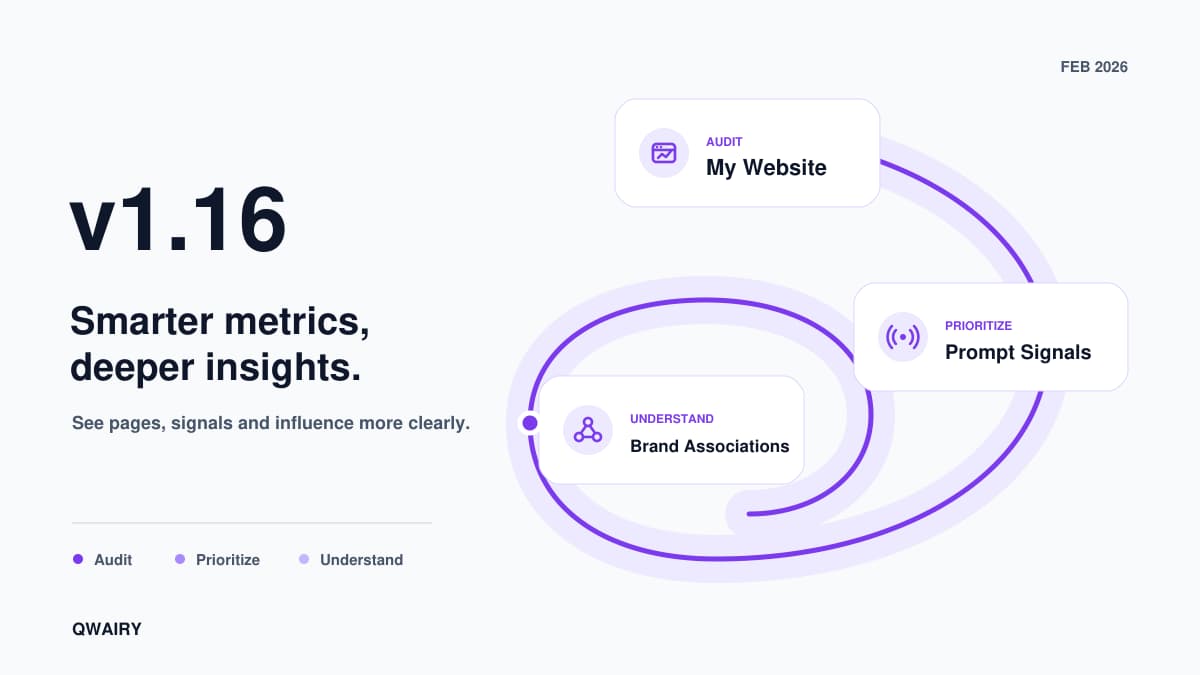
You know your brand is mentioned by AI. You track it, you monitor competitors, you run audits. But three questions keep coming back: Which of your pages does AI actually cite? How does AI describe your brand — not just whether it mentions it? And why did your Global Score keep going up while your visibility was flat? v1.16 is built around three priorities: understand what AI sees (My Website), analyze the signals that matter (Sentiment, Prompt Signals), and act on competitive intelligence (Competitor Influence, Content Discovery). Along the way, we removed two metrics that weren't working and replaced them with ones that are.
Your sitemap says you have 200 pages. AI models cite 12 of them. Three pages AI cites aren't even in your sitemap. My Website makes this visible.
Sync your sitemap and get a unified inventory where every page has a clear status:
Working — cited by at least one AI provider, health scores are acceptable
Needs Attention — cited but with low health scores or optimization issues
Not Cited — in your sitemap but no AI provider has ever cited this page
Discovered — cited by AI but not in your sitemap. These are pages LLMs found valuable on their own
Each page shows its GEO Score (0–100), citing providers, citation count, average position, and health scores (Technical, Content, AEO). Click any row to open the unified page detail.
The detail page has 4 tabs:
Overview — key metrics (GEO Score, citations, avg position, providers, AI Readiness), health score bars, recent citations grouped by prompt, and priority actions
Health — full diagnostics audit with Technical, Content, AEO, and Performance scores, plus issue-by-issue breakdown
GEO Optimization — 6-dimension analysis (GEO signals, sources, freshness, authority, metadata, source enhancement) with actionable recommendations
Citations — every AI response that cited this page, with provider, position, prompt text, and direct link to the response
Is your site blocking AI crawlers without knowing it? The AI Readiness page analyzes your technical setup:
AI Readiness Score (0–100) — how accessible your site is to AI crawlers
Crawler detection — status of GPTBot, ClaudeBot, PerplexityBot, GoogleOther, and 20+ AI crawlers in your robots.txt
robots.txt analysis — which rules affect AI access, with specific recommendations
llms.txt generator — generate a structured file that helps AI models understand your site hierarchy and key pages
Sitemap analysis — check your sitemap is accessible and properly formatted
**The insight:** One user discovered their robots.txt was blocking ClaudeBot and PerplexityBot — two providers that drove 40% of their competitor's citations. Unblocking them led to first citations within two weeks.
Open My Website | Platform Overview
Not all prompts are equal. Some are high-value opportunities where you're invisible. Others are already locked down. Prompt Signals scores every monitored prompt from 0 to 100 and tells you exactly what to do about it.
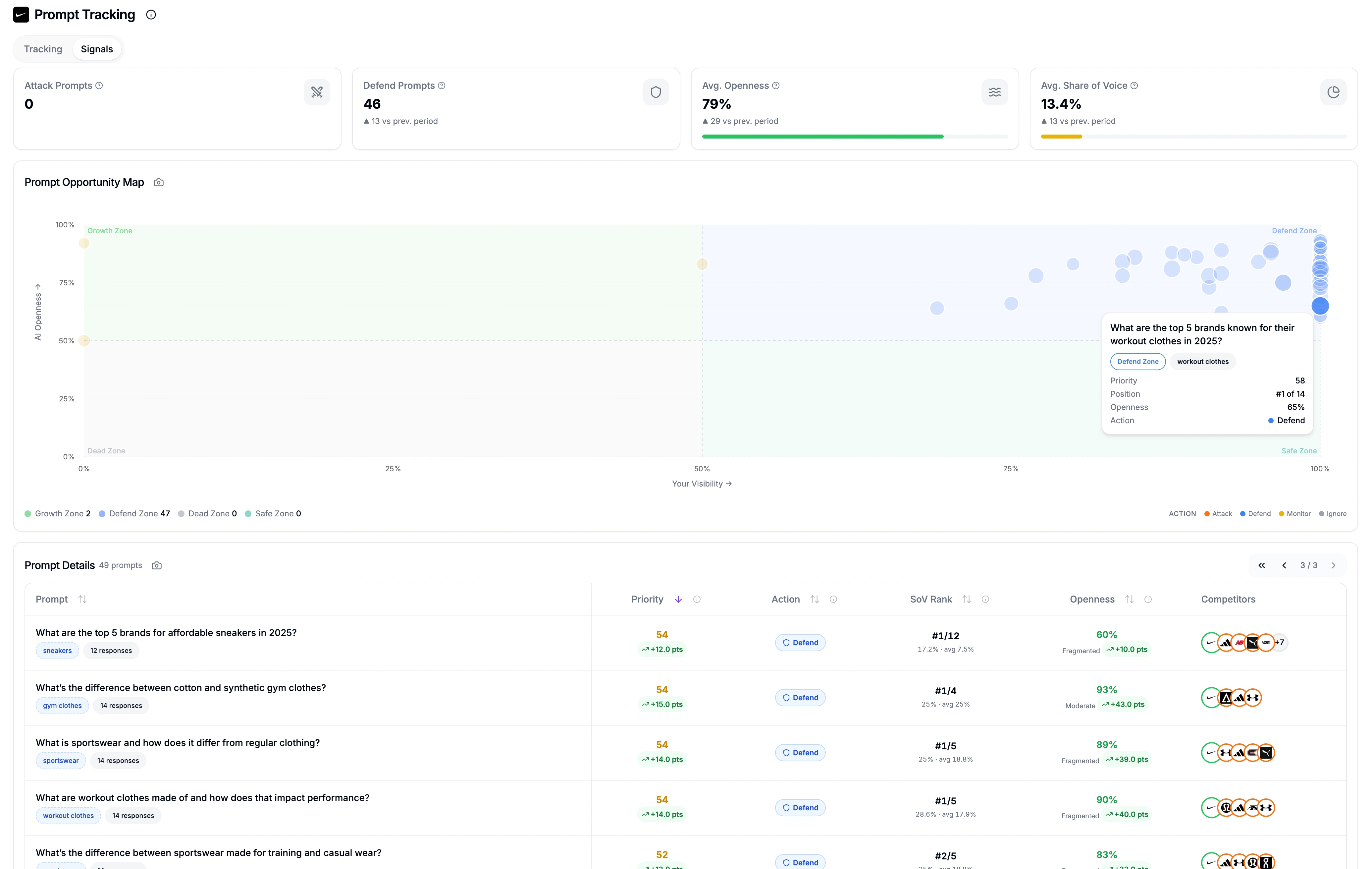
Every prompt gets a Priority Score combining Strategic Value (35%), Growth Potential (40%), and Competition Factor (25%). The score drives an automatic action label:
Attack — high value, low visibility, open AI responses. Invest GEO effort here
Defend — good position but volatile responses. Reinforce before you lose ground
Monitor — moderate opportunity, worth watching
Ignore — low value or already secure
Four KPI cards summarize your prompt set: Attack count, Defend count, Avg. Openness (how variable AI responses are), and Avg. Share of Voice among direct competitors. All with ▲/▼ trends vs. the previous period. The table below lists every prompt with sortable columns: Priority, Action, SoV Rank (your rank among direct competitors with SoV % and competitor average), Openness (1 − persistence), and a visual Competitors row. Click any row to open the detail sheet.
Click a prompt to get the full breakdown:
Share of Voice — every direct competitor ranked with dense ranking (ties = same rank), SoV percentage, and colored relationship rings (green for you, orange for direct competitors)
Priority Breakdown with human-readable values: "Competitors mentioned: 8 of 12", "Source citations: 24", "Gap to leader: −26.3pts", "Market concentration: HHI 22", "Direct players: 7 of 12"
Market conditions — web search rate, shopping rate, and market shape (fragmented → monopoly)
Period-over-period trends on Priority Score, SoV, and Openness. The system compares your current period against the previous period of equal length. All-time shows no trends
**The insight:** One user discovered three "Monitor" prompts had shifted to "Attack" in 30 days — competitors had dropped out and openness had risen. A single content update moved them from invisible to #2 on two of those prompts.
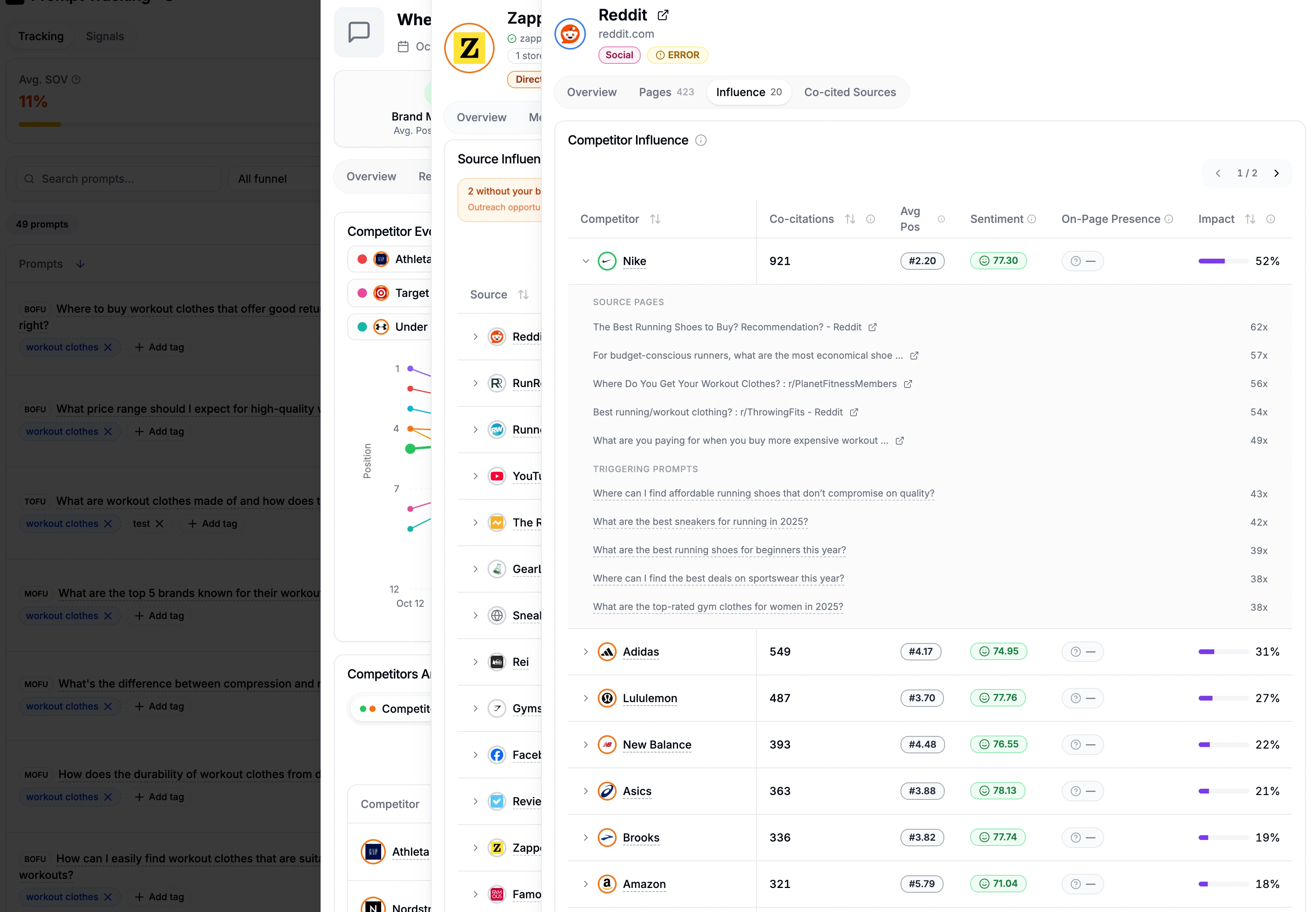
Knowing that a competitor is mentioned 200 times is useful. Knowing which sources consistently cite them alongside specific pages — and which other competitors AI models always group them with — is actionable. The competitor detail page now has two new tabs: Influence and Co-Mention.
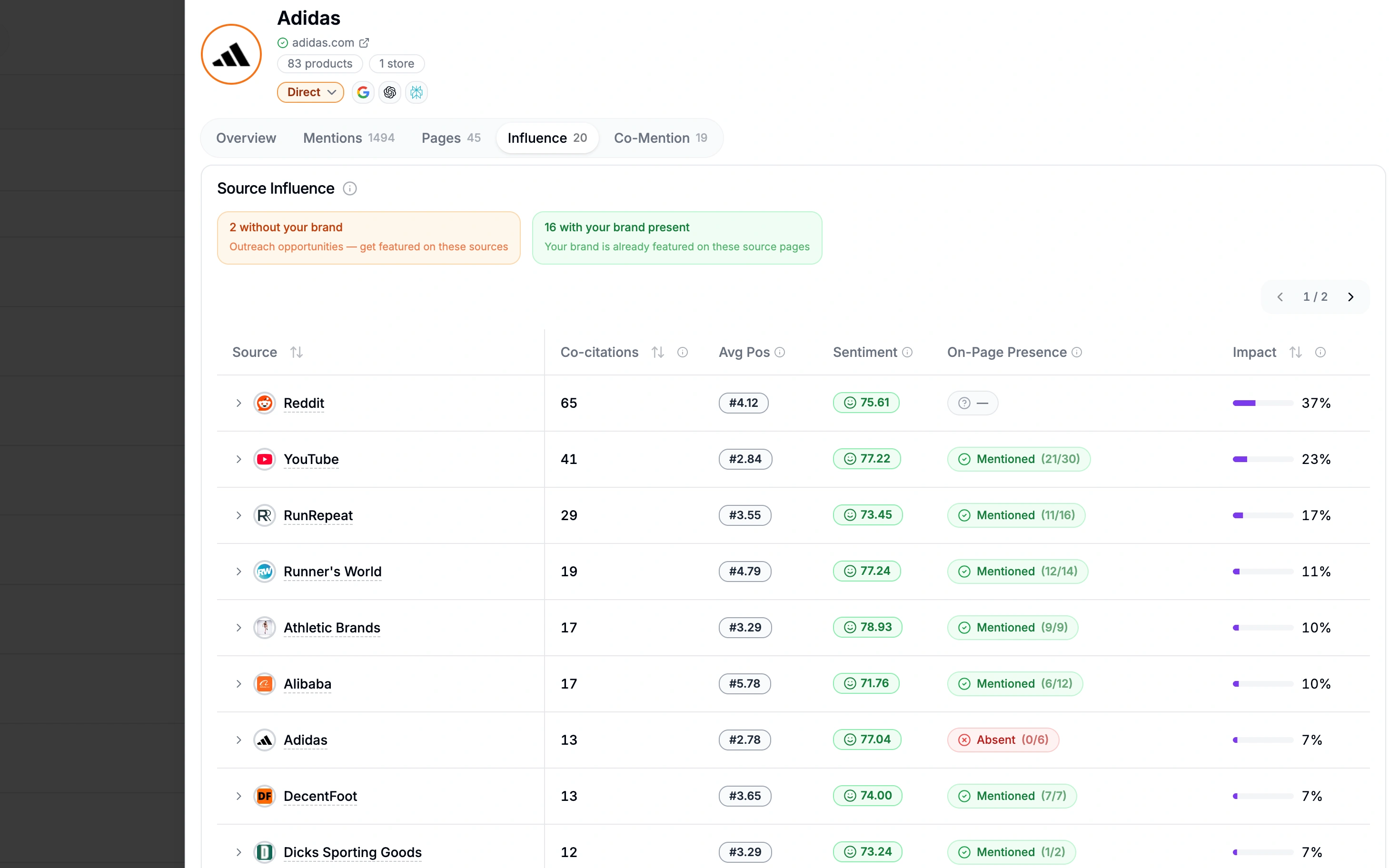
Lists every source domain that AI models co-cite alongside this competitor. Each row shows co-citation count, average position, sentiment, and an Impact ratio (what percentage of this competitor's mentions include that source). A Brand on Page column tells you whether your brand is present on that source's pages — sources without your brand are outreach opportunities. Click any row to expand the top URLs with mention count, mention status, and detected competitors per page.
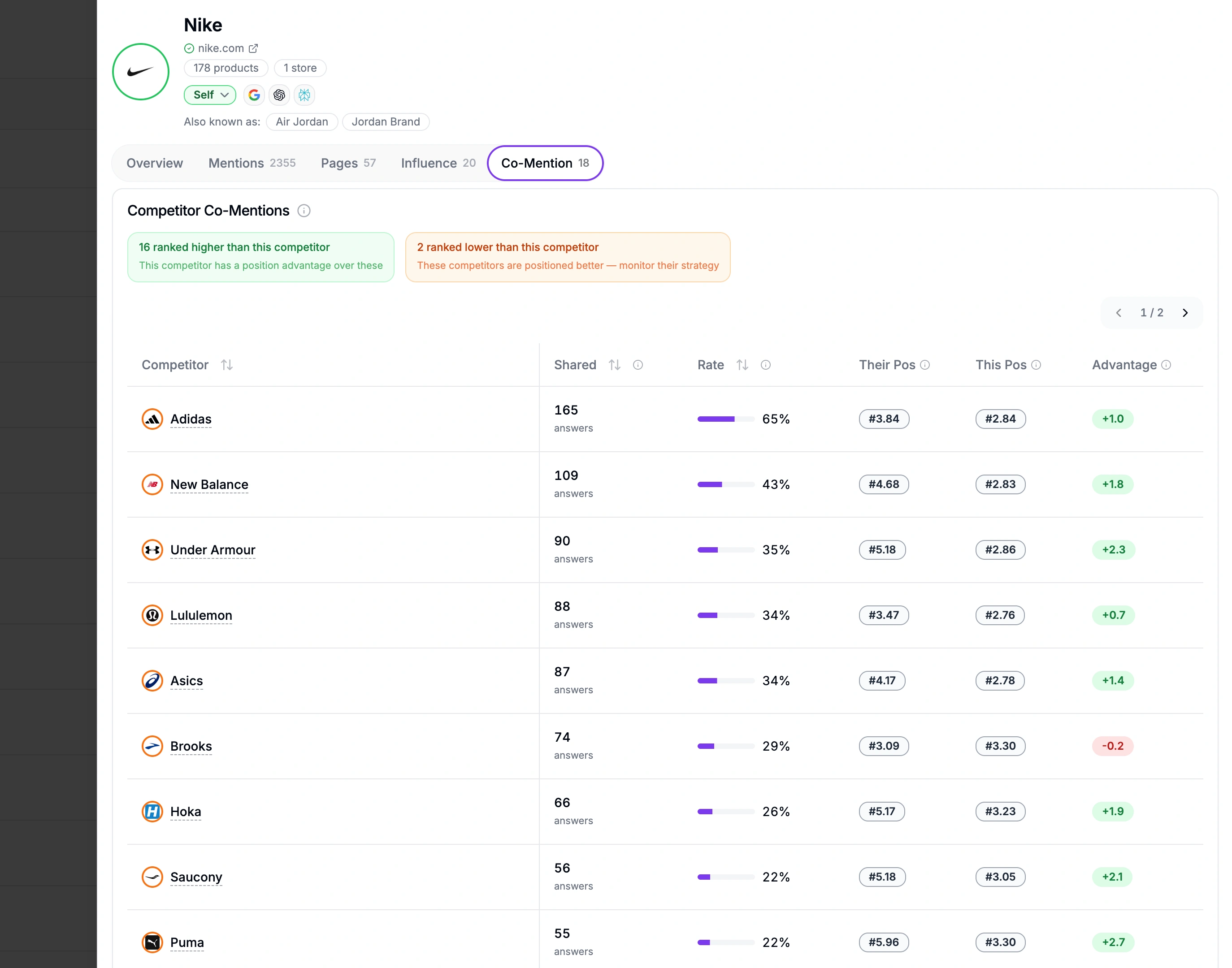
Shows every other competitor that AI models mention in the same responses. Each row displays shared answer count, co-occurrence rate, both competitors' average positions, and a position Advantage score. Positive advantage means this competitor ranks higher; negative means the other one does. INDIRECT competitors are filtered out — only DIRECT and SELF relationships appear, keeping the analysis focused on real competitive dynamics. Both tables feature sticky first columns, sortable headers, and tooltips on every column for quick context.
The same analysis exists on source detail pages — flipped to the source perspective. The Influence tab on a source shows which competitors AI models consistently co-cite alongside that source. Each row displays co-citation count, impact ratio, average position, sentiment, and whether your brand is present on the page. Sources where competitors appear but you don't are direct outreach targets. The Co-Cited tab lists other source domains that appear in the same AI responses. High co-occurrence between two sources means AI models treat them as complementary authorities on the same topics — useful for identifying content partnerships and link-building clusters.
**The insight:** One user discovered their top competitor was co-cited with a niche source domain on 60% of AI responses — but their brand wasn't on that source at all. A single guest post closed the gap on three high-value prompts.
Run a free audit: see if ChatGPT, Gemini and Copilot recommend you, in about a minute.
Prompt Tracking now includes a Discover tab that lets you find new monitoring prompts without leaving the page. Search a topic and get question-style prompts from four sources at once:
People Also Ask — Google's related questions, surfacing what real users search for
Reddit — community discussions and questions from relevant subreddits
Google Search Console — your own GSC queries filtered for conversational, question-like patterns
Bing Webmaster Tools — same filtering applied to your BWT query data
Results are refined by AI to remove duplicates, score relevance, and categorize by intent (informational, commercial, transactional). Select the prompts you want, save them, and they appear instantly in Prompt Tracking — ready for monitoring. The Create sub-tab is still available for AI-powered generation, manual entry, and CSV import.
**The insight:** Combining search console data with PAA and Reddit surfaces prompts you'd never find with keyword tools alone. One user discovered 15 high-intent prompts from their BWT data that competitors weren't monitoring at all.
When a source URL appears in at least two AI responses, Qwairy automatically visits the page to check whether your brand is mentioned — and which competitors are. No manual action needed. After each monitoring run, Qwairy identifies high-frequency sources and crawls them in the background. The results appear as a Brand on Page status in source detail views and competitor influence tables:
Mentioned — your brand appears on that page
Not Mentioned — competitors are there, but you are not
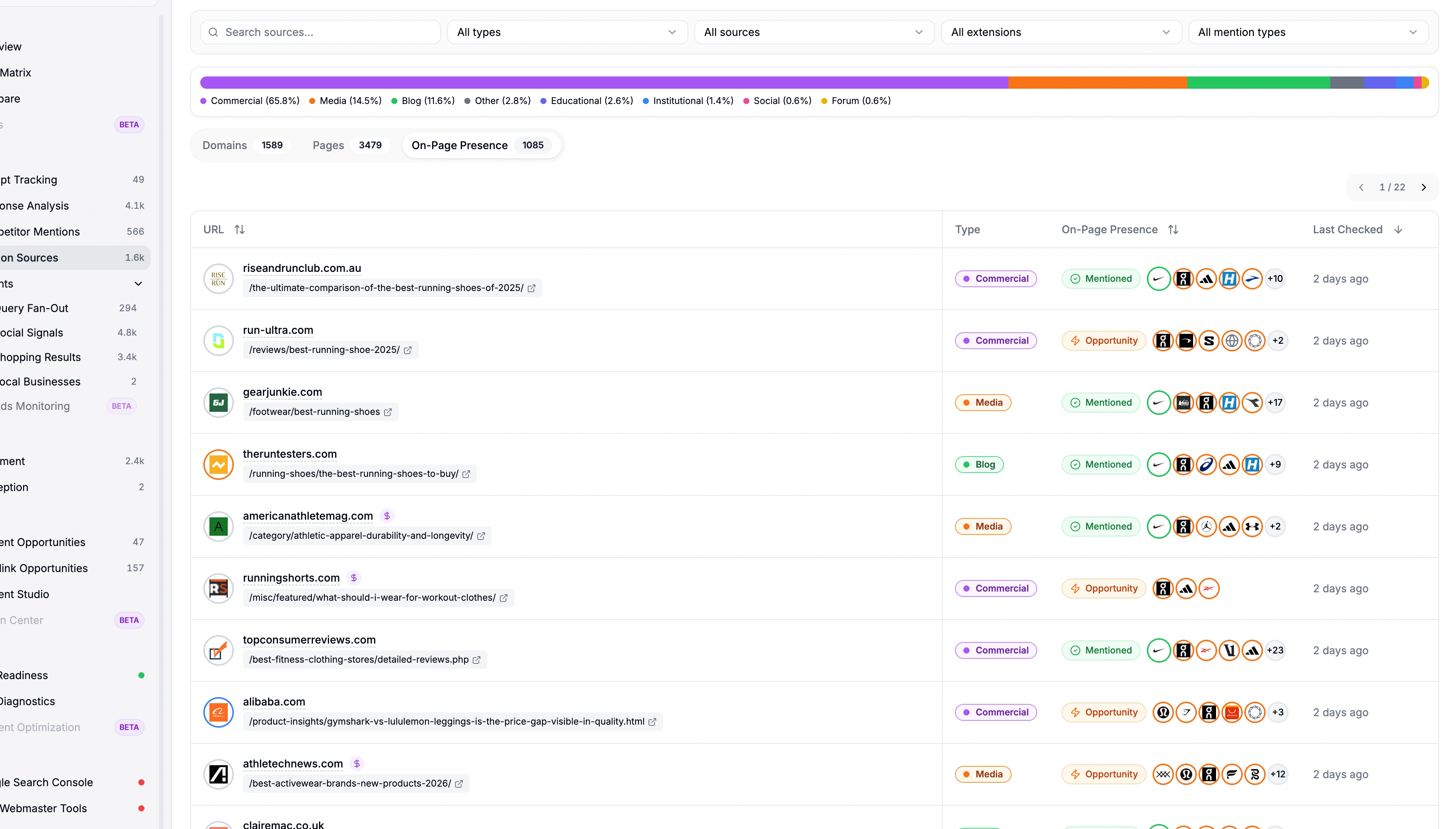
The most valuable outreach targets are pages that AI models already trust — and that mention your competitors but not you. Automatic source analysis surfaces these opportunities without any manual checking. Instead of guessing which sources to contact, you see exactly which high-authority pages talk about your market but leave you out.
**The insight:** One user found that 12 source pages cited by AI mentioned three competitors but not their brand. After reaching out to just four of those sources, they appeared in AI responses for seven new prompts within three weeks.
v1.16 removes three metrics and redesigns one page. Here's what changed and why.
The Global Score was the first thing you saw on your dashboard. One number, 0 to 100, summarizing your entire AI visibility. The problem: it was too good at hiding what was actually happening. A brand could score 72 while its Mention Rate was dropping — because Citation Rate and Sentiment were compensating. Another brand scored 45 with strong visibility on ChatGPT and Claude but zero on Perplexity. The single number couldn't tell you where to focus.
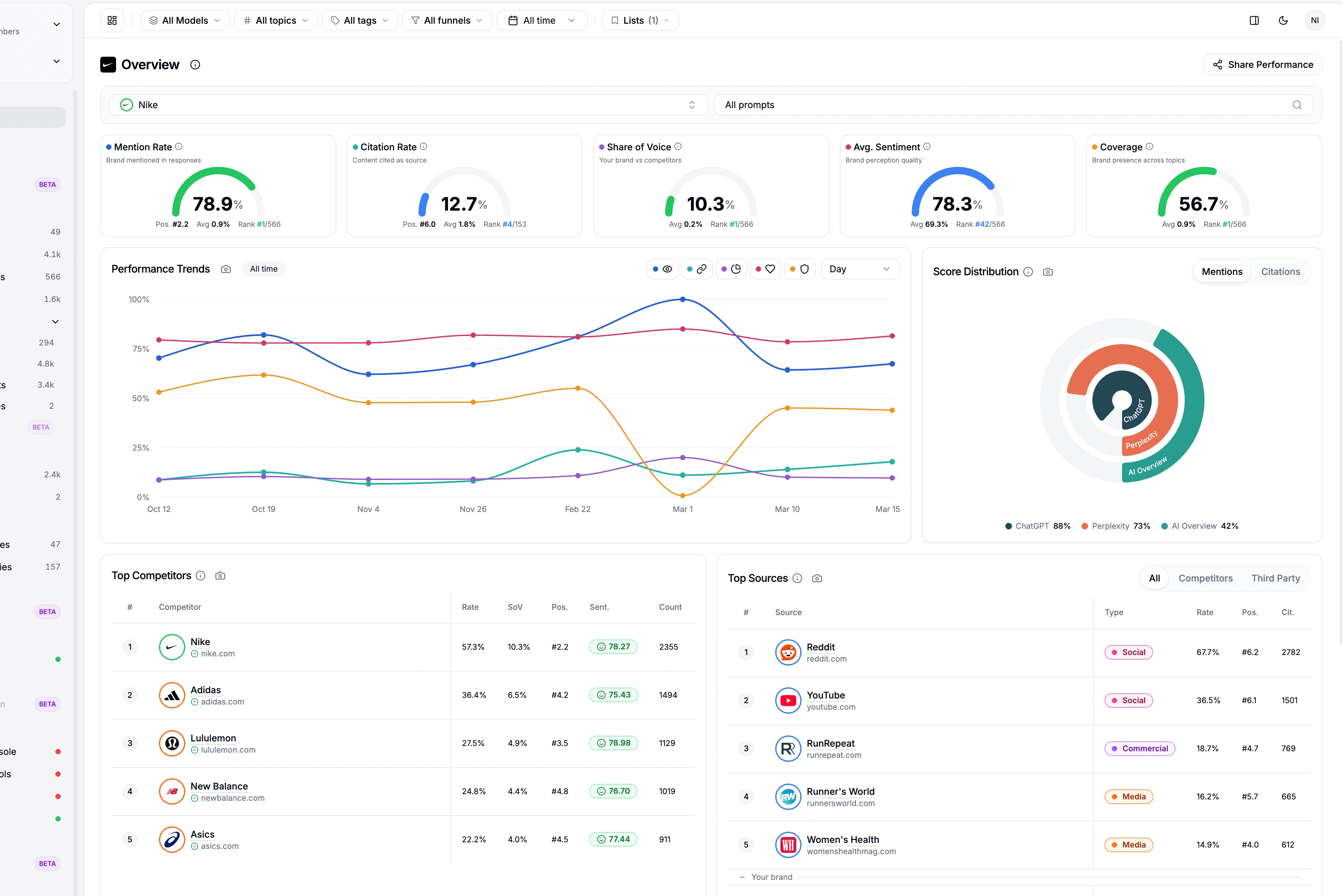
What replaced it: four hero metrics, each with its own score card, gauge, competitor rank, and trend:
Mention Rate — how often AI responses mention your brand
Citation Rate — how often they cite your pages as sources
Share of Voice — your share of mentions among direct competitors
Sentiment — how positively AI describes you (0–100)
Four scores instead of one means you know exactly where to act. Mention Rate dropping but Citation Rate stable? Your content is good — you need broader coverage. Share of Voice flat but Sentiment declining? Time to investigate what AI is saying about you.
The Relevance Score gave you a percentage, but no path to improve it. Its weight (10%) has been redistributed to Sentiment in the GEO Score formula. Sentiment now carries 20% instead of 10%.
The Perception page attempted to show how AI perceived your brand, but the data was too thin and not actionable. A replacement is in the works — a structured extraction of the actual words and attributes AI models use to describe you, organized into dimensions with sentiment and justification.
Sentiment Analysis was trying to do too much. The competitor dropdown forced you to navigate one-by-one. The 500-line mention table was raw log data, not analysis. We stripped it back to do one thing well: tell you how AI feels about YOUR brand.
No more competitor dropdown — focus is 100% on your brand. Compare competitors in the Compare view, not here
No more raw mention table — replaced by a synthesized dashboard
Score hero — your brand sentiment score (0-100) with trend indicator
Provider breakdown (new) — see which AI platform speaks most positively or negatively about you. ChatGPT positive, Claude neutral, Perplexity negative? Now you know where to focus
Top negative mentions (new) — the 5 harshest AI responses about your brand, with justification and a direct link to the full response. Fix what matters
Find the redesigned page under Analyze > Brand Sentiment.
The GEO Score formula now uses four sub-scores:
Sub-score | Weight |
Mention Rate | 35% |
Share of Voice | 25% |
Citation Rate | 20% |
Sentiment | 20% |
The old Relevance weight (10%) has been absorbed by Sentiment (from 10% to 20%). Total remains 100%. Bonus points (progression, quality, multi-provider presence, top position) still apply, capped at 100.
Two features move from their previous location into the Act section of the sidebar, making the content-to-action workflow more intuitive.
Find the gaps in your AI visibility. Content Opportunities analyzes your monitoring data to surface topics where competitors get mentioned but you don't. Each opportunity comes with:
LLM Potential Score (0–100) — how likely creating content on this topic will earn AI citations
Brand Gap vs. Source Gap — understand whether you're missing mentions, citations, or both
Priority ranking by business impact — focus on high-value opportunities first
One-click brief generation — turn any opportunity into a Content Studio brief instantly
Filter by keyword, tag, provider, or priority level. Export to CSV for team review.
See your mentions across ChatGPT, Claude and Perplexity in real time, the moment buyers ask.
AI cites authority sources. Backlink Opportunities aggregates 32+ backlink marketplaces and surfaces the best prices for domains that AI models actually trust:
32+ marketplaces compared — find the best price for any domain
AI citation tracking — focus on sources AI already uses as references
Domain authority and relevance scoring — prioritize quality over quantity
Competitor gap detection — see which sources cite your competitors but not you
Both pages are now accessible from Act > Content Opportunities and Act > Backlink Opportunities in the sidebar.
Content Opportunity tab — each prompt detail now includes a dedicated Content Opportunity tab with Brand Gap vs. Source Gap breakdowns and actionable recommendations
Backlinks tab — source detail pages now include a Backlinks tab with SEO metrics, marketplace offers from 32+ providers, and strategic context
Detail Sheets — every prompt, response, competitor, and source opens as an inline slide-over panel with stacked navigation (up to 4 levels deep). Drill down without losing your place, press Escape to go back, or maximize to open the full page
Workspace Integrations — a centralized page to manage Google Search Console and Bing Webmaster Tools connections. Previously scattered across separate pages, now under Workspace > Integrations
45+ Languages — expanded from 10 to 45+ languages including Japanese, Chinese, Arabic, Korean, Hindi, and Thai. All AI-generated content is produced natively in your chosen language
6-category navigation — the sidebar is reorganized into Cockpit, Monitor, Analyze, Act, Optimize, and Measure with collapsible sections for cleaner navigation
Not everyone navigates the same way. Some users prefer the inline detail sheets — quick drill-downs without leaving the page. Others want full-page navigation for a more focused view. A new toggle in the dashboard header (next to the theme toggle) lets you choose your default:
Side panel (default) — clicking any entity from a list opens the detail sheet. Same behavior as before
Full page — clicking any entity navigates to its dedicated full page instead
Your preference is saved in your browser and persists across sessions. The "Expand" button on detail sheets is not affected — it always opens the full page regardless of your setting.
Everything above is live today. Start with the three features that have the biggest impact:
Already on Qwairy? All features are available in your dashboard now. New here? Start free | Book a demo | GEO Guide
Track your mentions across ChatGPT, Claude, Perplexity and all major AI platforms. Join 1,500+ brands monitoring their AI presence in real-time.
Free trial • No credit card required • Complete platform access
Other Articles
Source Authority: Find the Sources That Shape AI Answers
Source Authority reveals which domains consistently shape monitored AI answers, turning citation reach, consensus, momentum, breadth, and context into a practical source strategy.
Agencies: Turn AI Visibility Audits into New Business
A practical playbook for turning unlimited AI visibility audits without automatic expiration into an agency growth engine, from lead magnet to monitoring.