Loading page

Use Bing Webmaster Tools' AI Performance dashboard to discover grounding queries, analyze citations, and optimize your content for Microsoft Copilot visibility.
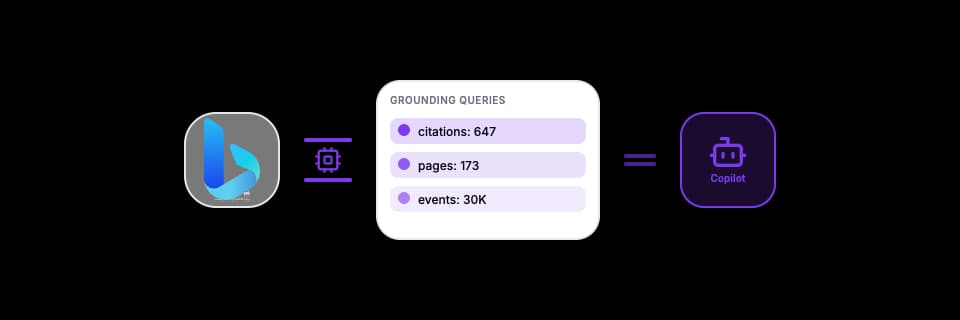
Bing Webmaster Tools just became the first search engine to give publishers direct visibility into how AI systems use their content. The AI Performance dashboard, launched in February 2026, shows citation data, grounding queries, and page-level performance. No other search engine provides this natively. Unlike Google Search Console where you need to reinterpret traditional search metrics for AI insights, BWT now shows native AI data (based on Copilot). This is a fundamental shift: you can see exactly how Microsoft Copilot retrieves, cites, and uses your content in AI-generated responses. This guide walks through everything you need to extract actionable insights from BWT's AI Performance dashboard, from understanding grounding queries to building a complete optimization workflow.
Microsoft Copilot is not just another chatbot. It's integrated into Windows, Edge, Microsoft 365, and Bing Search, reaching hundreds of millions of users daily across surfaces they already use. When a user asks Copilot a question in Edge or within Word, it pulls answers from Bing's index.
BWT's AI Performance dashboard is the only tool that shows how AI systems actually consume your content at the backend level.
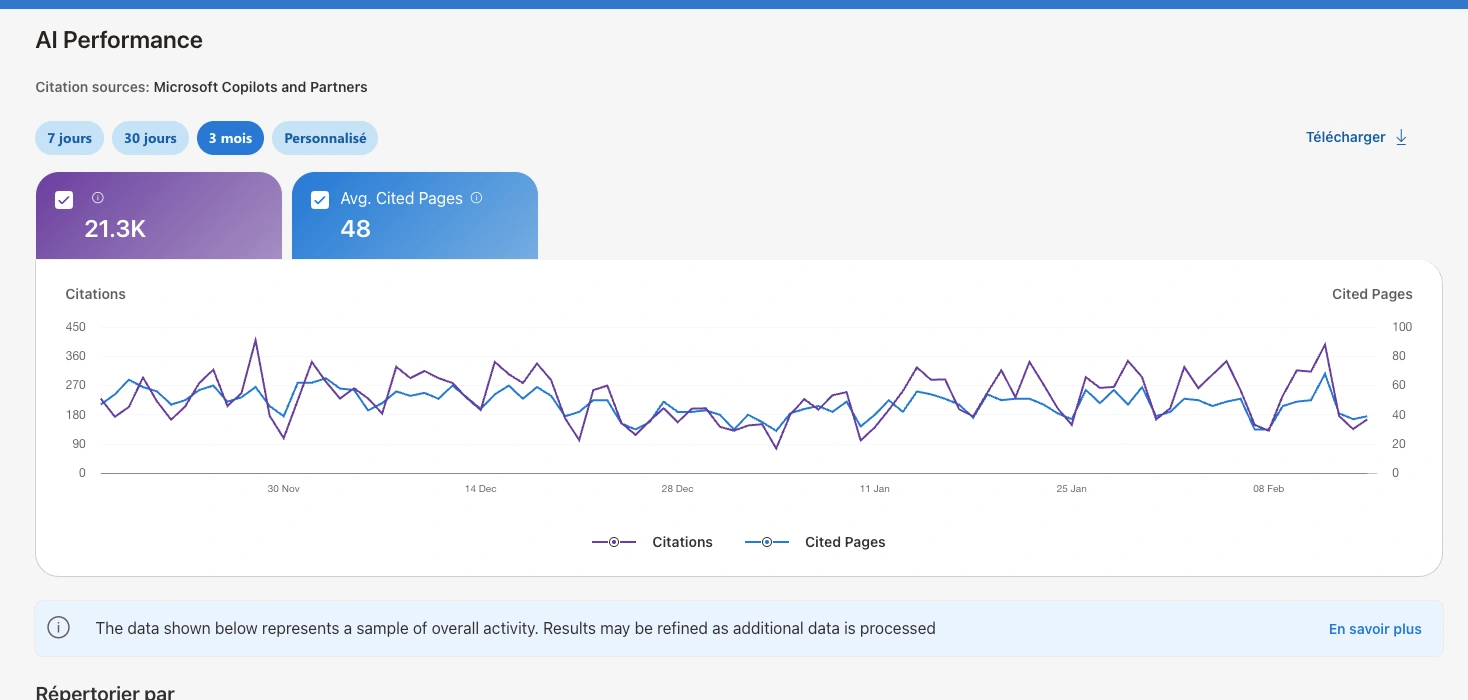
The AI Performance dashboard provides five core metrics that map directly to how Copilot uses your content:
Metric | What It Shows | Why It Matters |
Total Citations | Number of times your site was cited in AI answers | Your overall AI footprint |
Average Cited Pages | Daily average of unique URLs cited | How broad your content coverage is |
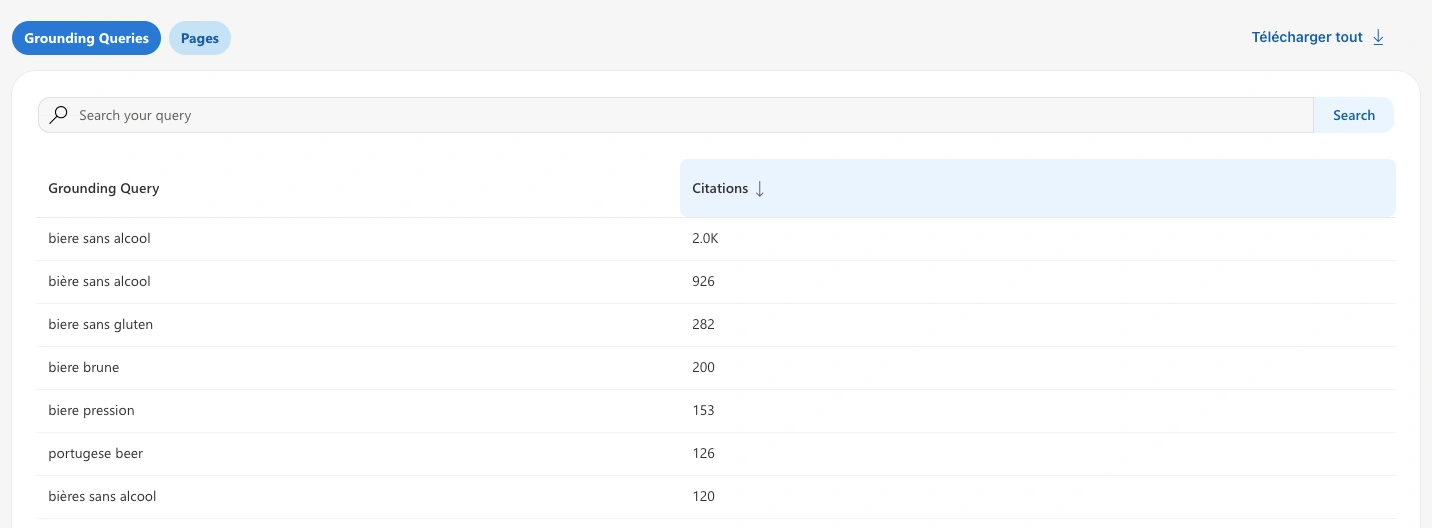
Grounding Queries | Sample phrases AI used to retrieve your content | Reveals how AI "sees" your content |
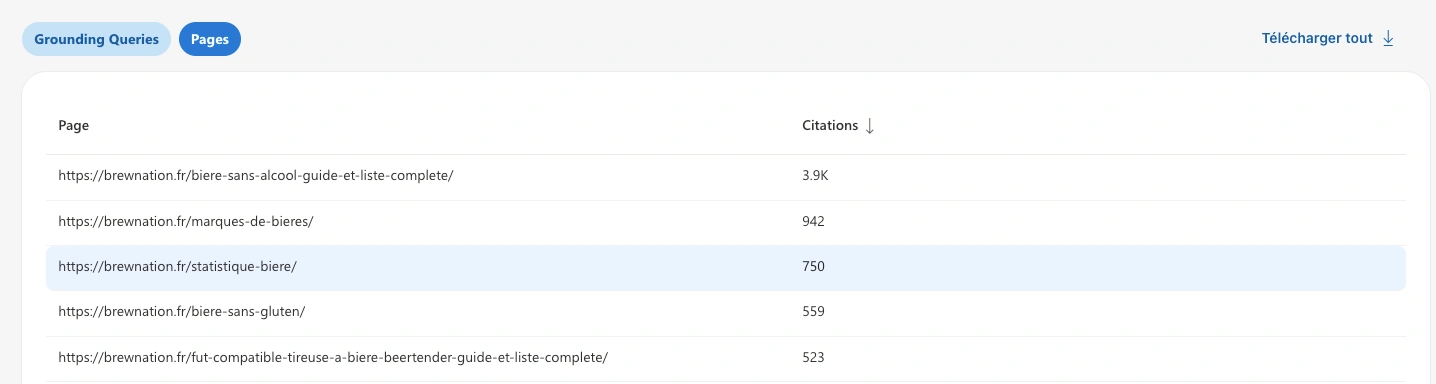
Page-Level Citations | Citations broken down by individual URL | Identifies your top-performing pages |
Visibility Trends | Citation fluctuations over time | Spot patterns and measure optimization impact |
Important distinction: These metrics reflect citation frequency, not ranking, clicks, or traffic nor prompts. A page with high citations is frequently used as a source by Copilot, but that doesn't directly translate to referral traffic. Think of it as measuring your role as an information source in the AI ecosystem.
Grounding queries are the most valuable data in the AI Performance dashboard, and also the most misunderstood.
What they are: When a user asks Copilot a question, the system doesn't search Bing's index with the user's exact words. Instead, it reformulates the question into one or more internal queries optimized for retrieval. These reformulated queries are what BWT calls "grounding queries."
Example: A user asks Copilot "What's the best project management tool for remote teams?" Copilot might generate grounding queries like:
project management software remote collaboration features comparison 2026
best project management tools distributed teams reviews
remote team productivity software pricing features
Notice the difference. The user's prompt is conversational and vague. The grounding queries are keyword-dense, specific, and optimized for Bing's index. They read like machine-generated retrieval queries because that's exactly what they are.
Why they matter: Grounding queries reveal how AI interprets user intent and what content it actually seeks. They show you the topics and entities your content is associated with in the AI's knowledge model. This is fundamentally different from traditional keyword data because it shows the retrieval layer, not the user-facing layer.
Practical value: If you see grounding queries appearing for your site that you didn't expect, you've discovered how AI categorizes your content. If you see queries you should appear for but don't, you've found a content gap. Either way, this data is actionable.
Run a free audit: in a few minutes, ChatGPT, Gemini and Perplexity answer 8 buying questions about your market live, and you see who they recommend.
A single user question doesn't trigger a single search. Copilot uses query fan-out, expanding one question into multiple sub-queries that explore variations, adjacent intents, and comparisons. Our study of 102K queries documented this pattern across AI platforms. Here's how grounding and fan-out work together:
Aspect | Grounding | Fan-Out |
Direction | Inward (narrows intent) | Outward (widens scope) |
Purpose | Verify and anchor in trusted sources | Explore variations and comparisons |
Result | Determines credibility and inclusion | Determines comprehensiveness and discovery |
Content need | Authority, documentation, facts | Breadth, scenarios, comparisons |
Fan-out generates 8 types of query variants from a single user prompt:
**Why this matters for **GEO : Your content needs to be retrievable across multiple reformulations, not just the exact user prompt. A single article that only answers one narrow question will get cited less than content that covers the topic breadth AI systems explore during fan-out. Think of it this way: when a user asks "What's the best CRM for startups?", Copilot doesn't just search for that. It fans out into pricing comparisons, feature lists, integration options, startup-specific reviews, and competitor analyses. If your content covers multiple angles, you'll appear in more of those sub-queries.
Start by reviewing the AI Performance dashboard overview:
Check your total citations count and trend direction
Identify your top-cited URLs and the topics they cover
Note whether your average cited pages count is growing or stagnant
Look for concentration risk: are 3-5 pages driving all your citations?
If you see extreme concentration (a few pages dominating), that's both a strength and a vulnerability. Those pages are clearly authoritative in AI systems, but you need to diversify. You can do that on our GEO Tool Qwairy .
Dive into the grounding queries section:
Review the sample queries BWT provides
Classify each by intent type: informational, comparison, how-to, recommendation, problem-solving
Identify topics where AI retrieves your content vs. topics where it doesn't
Look for surprising associations, such as queries you didn't expect to appear for
Pay special attention to comparison and evaluation queries. These are the highest-value AI prompts because they trigger multi-source responses where citation matters most.
Cross-reference your grounding queries with what you know about fan-out:
Look for grounding queries that cite competitors but not you
Map the fan-out variations your existing content doesn't cover
Prioritize MOFU/consideration queries, which represent 47% of AI grounding activity
Check if your content covers the breadth of angles fan-out explores (comparisons, alternatives, use cases, pricing)
Connect your server or CDN logs to see which pages known AI crawlers request, how often, and how that evolves.
Structure your content so AI systems can easily retrieve and cite it:
Use clear headings that match grounding query patterns
Build atomic facts, meaning independently retrievable passages that answer specific questions
Include specific data points, statistics, and evidence-based claims
Add schema markup for structured data recognition
Reference third-party validation and authoritative sources
For detailed guidance on content structure, see the E-E-A-T guide and citation optimization guide .
BWT only shows Copilot data. To understand your full AI visibility, you need cross-platform monitoring:
Track the same queries on ChatGPT, Perplexity, Claude, and Gemini
Compare which platforms cite you and which don't
Identify platform-specific patterns (some platforms favor different content types)
Use insights from one platform to optimize for others
See our brand tracking guide for a complete cross-platform monitoring setup.
BWT shows Copilot data. GSC shows Google data. But the AI landscape spans far more than two platforms, and managing them separately creates blind spots. Qwairy connects to both Bing Webmaster Tools and Google Search Console, bringing all your search and AI data into a single dashboard. On top of that, it monitors your brand visibility across all major AI platforms: ChatGPT, Perplexity, Claude, Gemini, and AI Overview . Here's how the tools work together inside Qwairy:
BWT data (connected to Qwairy) reveals your grounding queries and citation patterns in Copilot
GSC data (connected to Qwairy) surfaces volume-validated queries with AI potential
Cross-platform monitoring tracks those queries across ChatGPT, Perplexity, Claude, Gemini, and tracks your competitor presence
Cross-reference your BWT grounding queries with GSC volume data and Qwairy's AI monitoring results, all from one place. See which topics cite you in Copilot but not in ChatGPT, or vice versa. Where gaps exist, you have clear optimization targets.
To start using BWT AI Performance data for optimization:
Your content is already being used by AI systems. BWT now lets you see how. The question is whether you'll use that visibility to optimize, or leave it to competitors who will. Start monitoring your AI visibility with Qwairy and connect BWT, GSC, track across all platforms, and turn AI citations into growth.
Track the questions that matter to your business, see which brands each answer mentions and which sources it cites, then work on the gaps.
Free plan with 120 initial credits • No credit card required
Other Articles
Answer Engine Optimization (AEO): The Complete 2026 Guide
A complete, practitioner-level guide to Answer Engine Optimization: what AEO is, how answer engines like ChatGPT, Perplexity and Google AI Overviews select and cite content, the core levers, a step-by-step workflow, and how to measure it.
How to Set Up AI Referral Tracking in GA4, Plausible and Matomo
Most analytics tools miss or misclassify AI referral traffic by default. This step-by-step guide shows you how to properly track visits from ChatGPT, Perplexity, Claude, Gemini, and other AI platforms in GA4, Plausible, and Matomo.